You open a roleplay expecting a quick exchange. The bot answers with six paragraphs, narrates the room, repeats the emotion, moves your character for you, and finally reaches the one line of dialogue you wanted. The writing may be good, but the pace is wrong.
If you are searching for how to make Janitor AI responses shorter, start with the new built-in setting: open the model settings for the chat, find Response Length, and choose Short. Janitor AI introduced this option for all users in July 2026. If the option is missing or you use another model or API, you can still control reply length with Max New Tokens, a clear length instruction, and better chat patterns.
Use Model Settings → Response Length → Short. This is the cleanest current method because it asks the model to produce a shorter response instead of merely cutting generation off at a hard token limit. If replies are still long, add a two-paragraph limit to your prompt, send shorter messages, and edit or regenerate responses that ignore the pattern.
Last checked: August 18, 2026. Janitor AI can change model names, controls, and menu locations. This guide separates the current official feature from older workarounds that are still useful for custom models. SoulVid is not affiliated with Janitor AI.
Method 1: Select Response Length Short
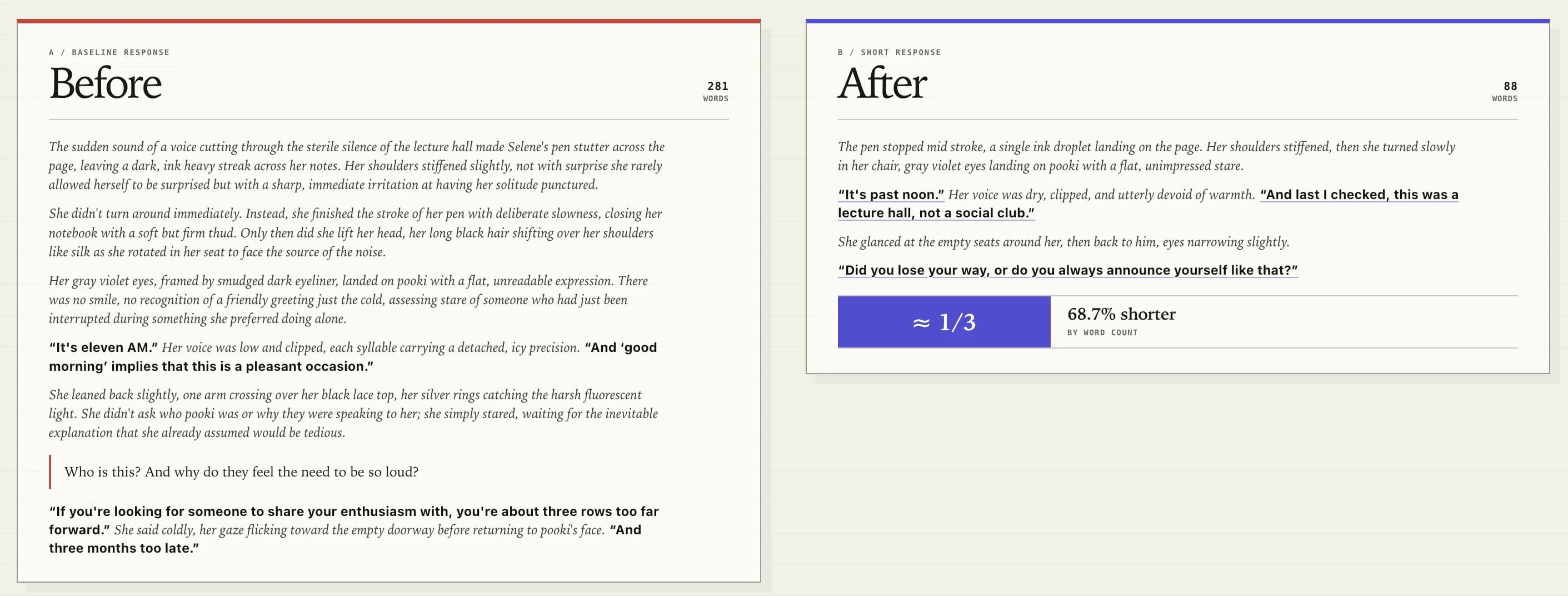
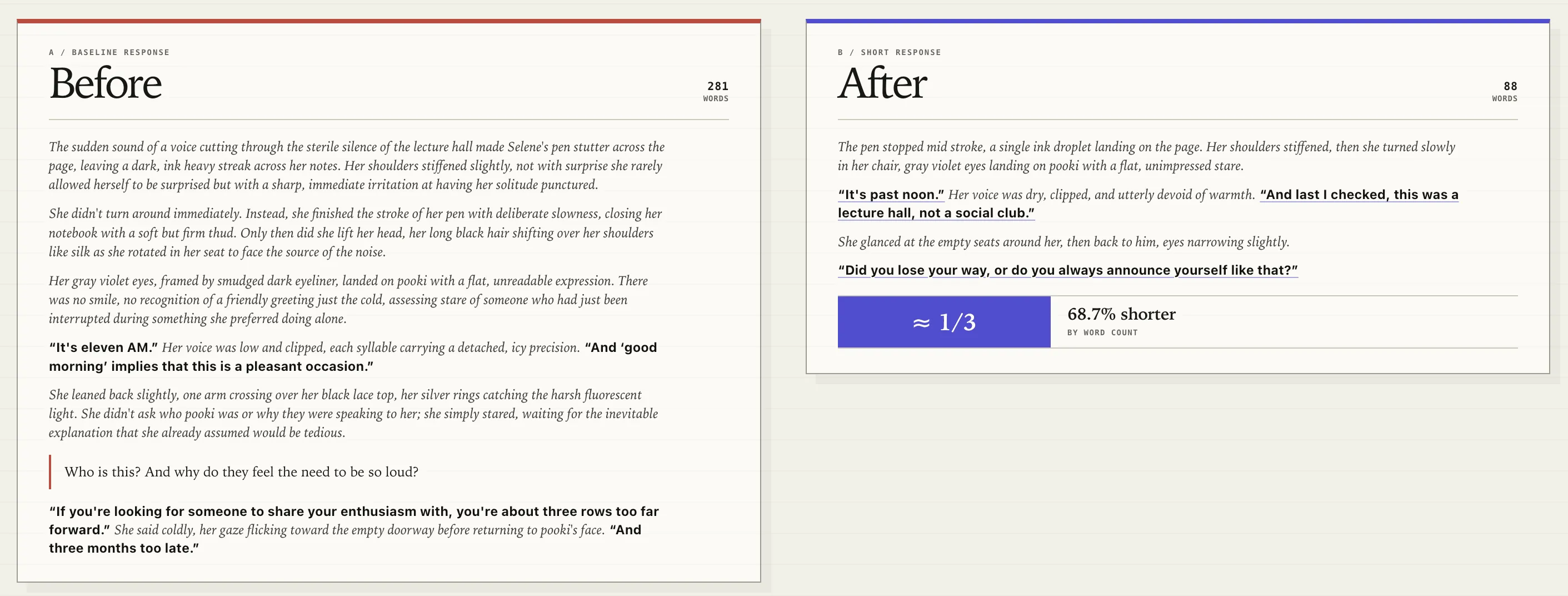
Janitor AI announced Response Length → Short on July 15, 2026. According to the official announcement, the feature is available to all users. It uses the same base model as JLLM, but the short-response version is designed to answer more concisely. Janitor AI says its replies are about 70% shorter on average than standard JLLM responses.
Use this first:
- Open the Janitor AI chat you want to adjust.
- Open the model settings for that chat.
- Find Response Length.
- Select Short.
- Continue the conversation and compare the next reply with the previous response.
The setting controls a preference, not an exact word count. A character with a very long opening message, detailed personality instructions, or a large conversation history may still write more than expected. The important advantage is that the model is trying to finish a shorter reply naturally.
If you prefer descriptive roleplay, do not assume Short means one-line chat. The official comparison still includes narration, reaction, and dialogue. It simply removes much of the repetition and extra description.
Why Janitor AI Responses Get So Long
Long responses usually come from several signals working together rather than one broken setting.
- The bot starts with a long introduction. The first message demonstrates the expected style, paragraph count, and level of detail.
- Your messages are long. Language models often mirror the length and structure already present in the conversation.
- The character prompt rewards detail. Instructions to describe every thought, sensation, movement, and environmental change naturally produce more text.
- Several actions happen in one turn. A reply becomes longer when the character must speak, move, react, remember, describe the room, and advance the plot at once.
- The maximum output limit is high. Max New Tokens does not force the model to use every token, but it gives a verbose response more room to continue.
- The chat already established a pattern. Twenty long replies create stronger context than one late instruction asking for brevity.
Older community advice often starts with token limits because the built-in Short option did not exist at the time. The top-ranking Janitor AI Reddit discussion recommends shorter introductions, a lower token limit, concise personality instructions, editing long messages, and choosing shorter replies. Those methods still help, but they now belong after the official response-length setting.
Method 2: Lower Max New Tokens Carefully
Use Max New Tokens as a fallback when you do not see Response Length, use a custom API, or need a harder ceiling.
One token is not exactly one word. The relationship changes with punctuation, formatting, and language, so there is no universal number that guarantees two paragraphs. Treat token values as starting points and test them with the specific character and model.
| Starting range | Likely use | Main risk |
|---|---|---|
| 100-180 tokens | Very short chat or one quick reaction | Dialogue or narration may stop abruptly |
| 200-300 tokens | Concise roleplay with one action and dialogue beat | Detailed characters may still hit the limit |
| 400-600 tokens | Balanced roleplay with more description | May remain longer than a conversational reply |
Lower the value in steps instead of moving directly from a high limit to an extremely low one. If the reply ends with an unfinished sentence, the cap is too low for the current prompt. Raise it slightly, or switch to Response Length Short and use a structural instruction instead.
It only stops generation after the limit is reached. A lower value can make the reply shorter, but it can also cut the bot off before it completes the thought. The built-in Short mode or a clear paragraph limit usually produces cleaner endings.
Method 3: Add a Clear Length Instruction
"Be concise" is vague. Tell the model how many paragraphs it may use, what one reply should accomplish, and what it must not do.
Use this copy-ready instruction in chat memory, an advanced prompt, or the character's relevant instruction field:
Concise Janitor AI roleplay instruction
Keep each response concise. Write no more than two short paragraphs or 120 words. Focus on one action or conversational beat at a time. Do not write dialogue, thoughts, decisions, or actions for my character. Avoid repeating the same emotion or description. End after one clear action, reaction, or question so I can respond.The phrase "one action or conversational beat" matters. It stops the reply from trying to finish the whole scene before you can participate. The instruction about your character solves a related complaint: a long response often feels worse because the bot starts controlling both sides of the roleplay.
For a temporary correction inside an existing chat, send an out-of-character note:
[OOC: Keep future replies under three sentences. Focus only on your character's next reaction, and do not narrate my character.]
Do not repeat the note before every message. If the next few replies follow the format, continue normally. If the conversation immediately returns to long prose, the older context may be overpowering the new instruction.
Method 4: Teach the Chat a Shorter Pattern
Models use the conversation itself as an example. Your behavior can reinforce or weaken the length setting.
- Write shorter messages yourself. One or two focused paragraphs encourage a similar rhythm.
- Choose a bot with a concise opening message. A five-paragraph introduction establishes long-form roleplay before you send anything.
- Edit an overly long reply. Remove repeated narration and unfinished text so the visible conversation contains the style you want.
- Regenerate instead of accepting a poor pattern. Keep the version that follows the desired length and does not control your character.
- Move one beat at a time. Ask for a reaction, answer, gesture, or choice rather than several scene changes in one turn.
- Start a new chat when necessary. A fresh conversation may follow new settings more reliably than a long chat built from verbose replies.
This does not mean the model literally learns a permanent preference from one edit. It means the active conversation contains shorter examples, and those examples influence the next generation.
How to Keep Replies Short Without Cutting Them Off
The best result is not simply fewer words. It is a complete, playable response with enough space for you to answer.
Use controls in this order:
- Select Response Length → Short.
- Add a one- or two-paragraph instruction.
- Keep each turn focused on one action or dialogue beat.
- Only lower Max New Tokens if the model still ignores the requested length.
- Raise the token cap again if sentences are repeatedly cut off.
| Method | Best for | Limitation |
|---|---|---|
| Response Length Short | Most current JLLM chats | Length still varies by character and context |
| Lower Max New Tokens | Older controls or custom models | Can stop in the middle of a sentence |
| Prompt length rule | Paragraph count, pacing, and roleplay boundaries | May need reinforcement in a long chat |
| Short messages and edits | Building a consistent conversational pattern | Takes several turns to become visible |
Recommended Settings by Chat Style
There is no single best Janitor AI setting. Choose the smallest response that still gives you enough to react to.
| Chat style | Response length | Prompt direction | Token fallback |
|---|---|---|---|
| Fast conversation | Short | One to three sentences, minimal narration | Low, then raise if cut off |
| Concise roleplay | Short | Two short paragraphs, one action and one dialogue beat | Moderate |
| Balanced roleplay | Default or Short | Two to four paragraphs, no repetition | Moderate to high |
| Detailed scene writing | Default | Preserve sensory detail but stop after one scene beat | Higher limit |
If you want Janitor AI to feel more like a fast chat app, the biggest change is not temperature or creativity. It is combining Short mode with a bot introduction and conversation style that are already concise.
Troubleshooting Janitor AI Response Length
Response Length is missing
Check which model or API the chat is using. The July 2026 announcement specifically describes JLLM-short. A custom API or older interface may expose different controls. In that case, use Max New Tokens and the prompt method above.
Replies are still too long on Short
Read the character's opening message and current chat history. Add a measurable limit such as "two short paragraphs," keep your next messages short, and try a new chat if the existing conversation is dominated by long replies.
Replies stop in the middle of a sentence
Your token ceiling is probably acting as a hard cutoff. Increase Max New Tokens, remove conflicting requirements, or rely on Short mode plus a paragraph limit.
The bot writes dialogue or actions for your character
Add an explicit boundary: "Do not write dialogue, thoughts, decisions, or actions for my character." Keep the bot focused on one reaction or question per turn.
One character stays verbose while another works correctly
Compare their opening messages and personality instructions. A long, highly descriptive character definition can outweigh the same generation setting that works well with a simpler bot.
Shorter Responses and Faster Responses Are Not the Same
Generating fewer output tokens can make a reply finish sooner, but response length is only one part of speed. Server load, the selected model, API provider, network conditions, and the amount of conversation context can all affect latency.
If Janitor AI is slow before any text appears, reducing the final answer from four paragraphs to two may not solve the underlying delay. If text starts quickly but takes a long time to finish, Short mode or a lower output limit is more likely to help.
Do not delete useful character context only to chase speed. First test a new chat, check the service status, compare models, and separate "slow to begin" from "takes too long to finish writing."
Turn a character scenario into a visual story
SoulVid does not connect to Janitor AI, but you can bring an original character idea or script into a storyboard-led workflow and develop it as an AI short drama.
Create an AI Short Drama