A finished BandLab song can become a music video in two very different ways. You can use BandLab Video Mix for a quick performance or lyric post, or you can turn the same track into a multi-scene story with a planned cast, locations, camera language, and visual continuity. This guide shows how to make a music video for a BandLab song without treating those two workflows as if they produce the same result.
The walkthrough follows one realistic 60-second Alternative R&B collaboration: a singer working the night shift in a convenience store begins seeing another version of herself in the security monitors. The producer, singer, and guitarist finished the track remotely in BandLab; the video must preserve their credits while turning the final mix into a coherent narrative.
- Song
- A finished BandLab mixdown, lyrics, and optional stems
- Case
- A 60-second Alternative R&B narrative-performance MV
- Plan
- Song cue sheet, visual brief, characters, and storyboard
- Output
- One full MV plus vertical social cuts
BandLab Video Mix or a Full AI MV?
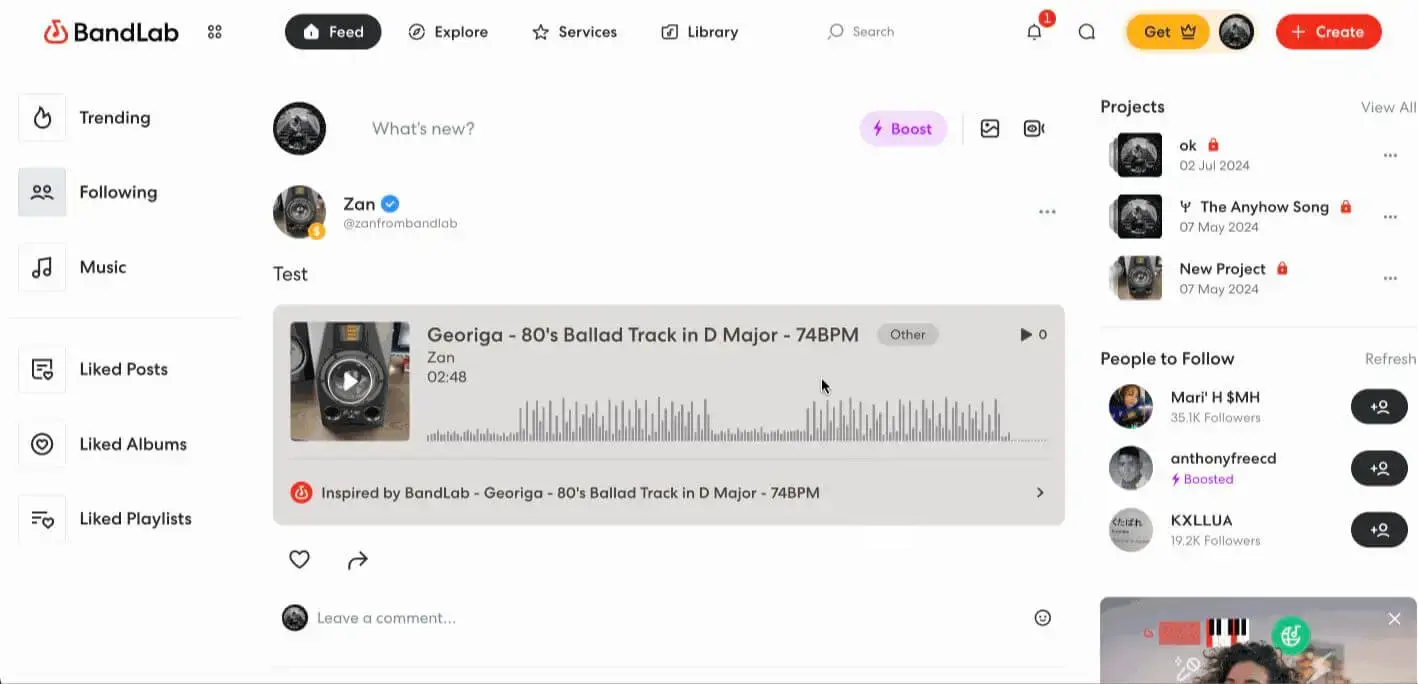
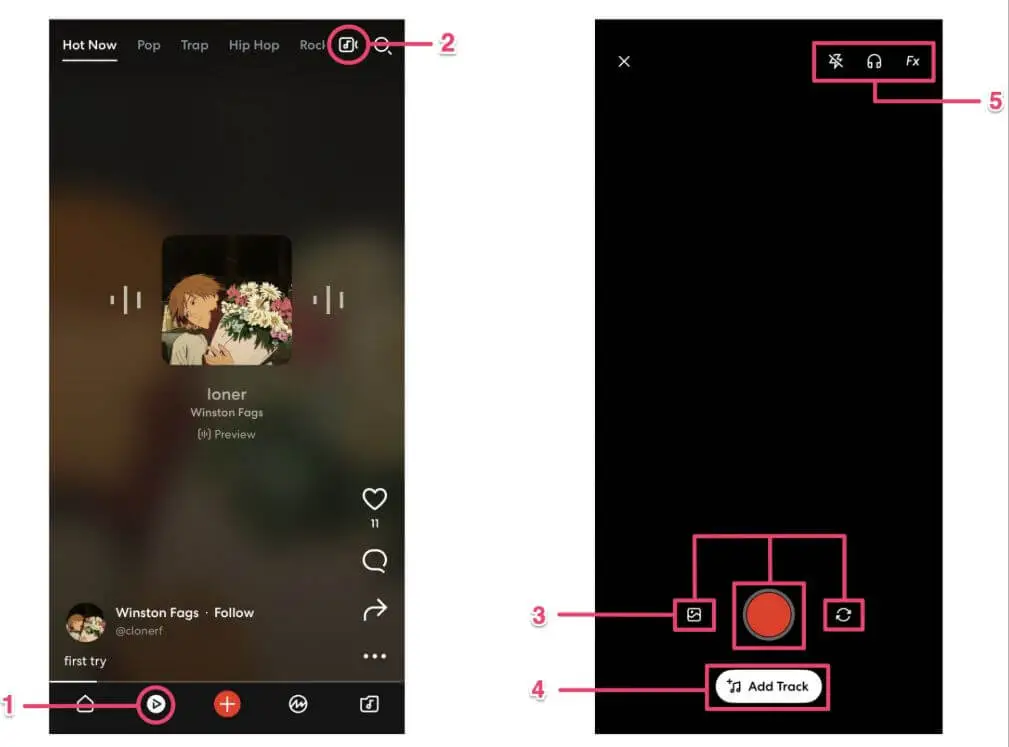
BandLab already includes a native video option on Android and iOS. Open Video Mix in the mobile app, record or upload a phone video, tap Add Track, and choose a song from your Library. You can then balance the track and video volume, download the result, or publish it to the BandLab Feed.
That workflow is a strong fit when the visual idea is one continuous performance: singing to camera, lip-syncing, freestyling, showing a studio session, or adding lyrics over simple footage.
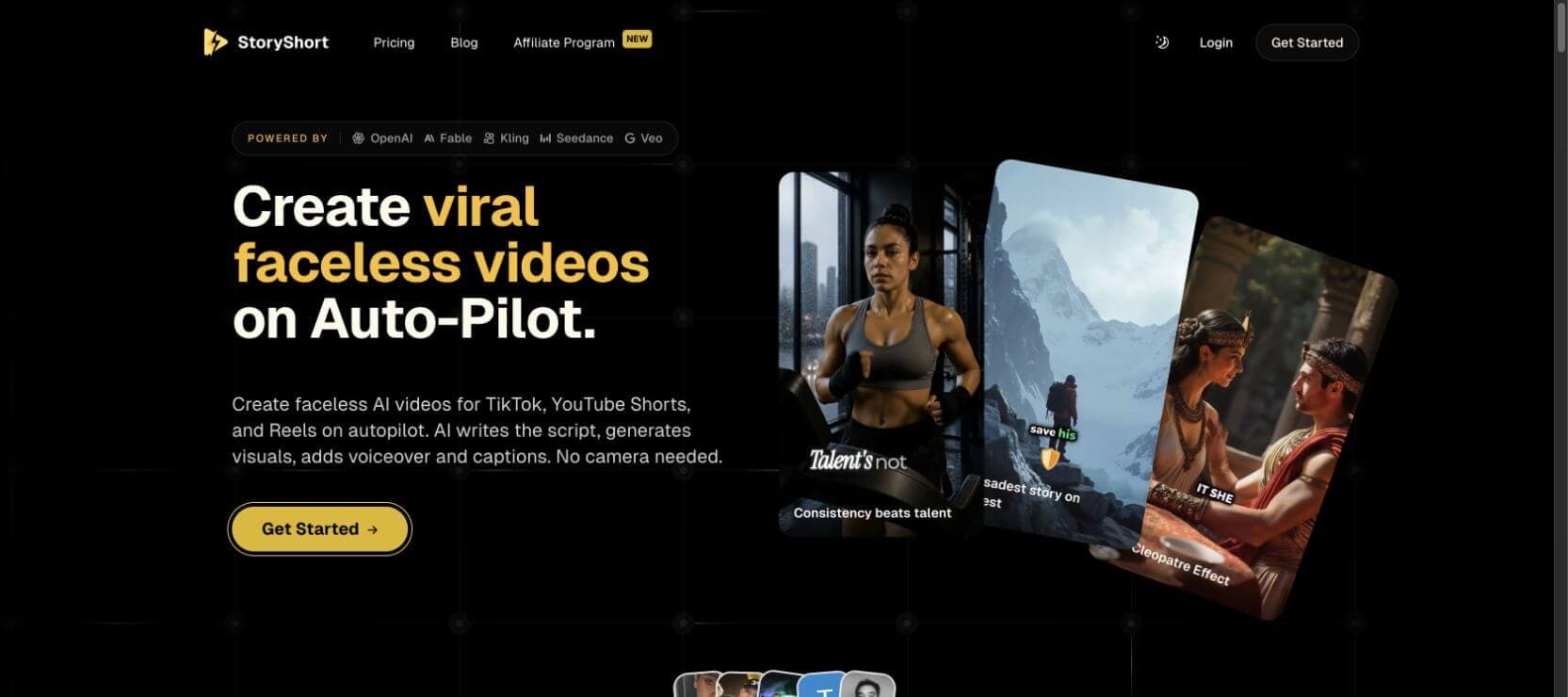
A complete narrative MV is a different production problem. If your concept needs multiple locations, recurring characters, insert shots, a reveal, or a chorus that changes the visual world, first convert the song into a cue sheet and storyboard. That is where a storyboard-led tool such as SoulVid's AI Music Video Generator becomes useful.
| Your goal | Better starting point | Why |
|---|---|---|
| Film yourself singing or lip-syncing | BandLab Video Mix | Fast mobile recording with a BandLab track |
| Add synchronized lyrics over footage | BandLab Lyric Video Generation | Native lyric overlay inside Video Mix |
| Build a multi-scene visual story | SoulVid | Story, characters, storyboard, and shot continuity |
| Make both performance and narrative footage | Use both | Record authentic performance in BandLab, then plan the wider MV separately |
What Video Mix Can and Cannot Do
Video Mix is not merely a static cover-art export. It can combine a selected BandLab track with recorded or uploaded video, apply effects presets, monitor audio while recording with headphones, balance track and video volume, and download the result before posting.
Its creative boundary is equally important. The tool starts with footage you record or upload. It does not automatically interpret the whole song as a screenplay, design a recurring cast, create several locations, or plan a sequence of cinematic shots. That is not a failure; it is the difference between a social performance tool and a full MV production workflow.
Use Video Mix when all three statements are true:
- The visual idea can be explained as one performance or one piece of footage.
- You are comfortable shooting or supplying that footage yourself.
- You want a fast mobile output for the BandLab Feed or another social platform.
Plan a full MV when one or more of these are true:
- The chorus needs a visual transformation or story payoff.
- The same character must remain recognizable across multiple scenes.
- The video alternates between performance, narrative, and detail shots.
- You need several aspect ratios or a longer sequence assembled from multiple clips.
Use BandLab's Lyric Video for Simpler Posts
For a lyric post, open the lyric tool from the Video Mix editing toolbar after adding a vocal track. The panel pulls lyrics from the selected track and creates a synchronized lyric video. The current interface shows a 50-Token generation cost, so confirm that the selected section contains vocals before you tap Generate.
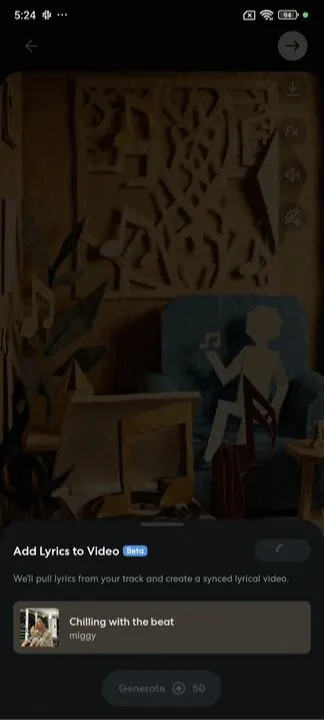
Choose this route when lyrics and performance footage are the main attraction. For After Closing, it would work for a simple chorus teaser filmed in the store, but it would not create the alternate-life monitor story by itself.
BandLab Video Mix vs SoulVid
| Capability | BandLab Video Mix | SoulVid |
|---|---|---|
| Primary job | Pair recorded or uploaded footage with a BandLab track | Turn audio and a creative brief into a planned multi-scene video |
| Best for | Freestyle, lip-sync, shoutouts, performance clips, lyric posts | Narrative MVs, recurring characters, multiple scenes, editable storyboards |
| Starting media | Phone recording or uploaded video plus a BandLab track | Audio, lyrics, story direction, and visual references |
| Story planning | Creator plans the footage outside the tool | Story and storyboard are part of the workflow |
| Character continuity | Depends on the footage you supply | Can be planned with references and shot-level review |
| Platform | Android and iOS for Video Mix | Web-based creation workflow |
The choice is not always either-or. Record the singer's most authentic close performance in Video Mix, then use that performance as a reference for a larger storyboard-led MV. The right division depends on whether the song needs immediacy, narrative scale, or both.
A 60-Second BandLab Music Video Case Study
Imagine a three-person BandLab collaboration called After Closing. Maya records the lead vocal, Theo produces the beat and synth arrangement, and Jules adds processed electric guitar. The finished song is slow Alternative R&B at 82 BPM, with an intimate verse, a widening pre-chorus, and a chorus built around the lyric, "I keep meeting the life I did not choose."
The 60-second edit uses this section:
| Time | Music cue | Visual job |
|---|---|---|
| 0-8 sec | Refrigerator hum, muted keys, first breath | Establish the empty convenience store and the singer's isolation |
| 8-22 sec | Verse vocal enters | Show her routine while the security monitors lag behind her movements |
| 22-31 sec | Guitar texture and rising harmony | Introduce the alternate version of Maya inside one monitor |
| 31-48 sec | Chorus and full drums | Alternate performance shots with monitors showing different lives she could have lived |
| 48-56 sec | Instruments drop away | The alternate Maya looks directly through the screen and mouths the next lyric first |
| 56-60 sec | Final guitar tail | Every monitor goes black; the real Maya's reflection remains in the glass door |
This concept stays practical because it has one lead character, one main location, one recurring prop system, and one visual rule: the security screens reveal alternate versions of the same woman. The chorus can feel larger without introducing crowds, car chases, or unrelated locations.
Prepare and Download the Final BandLab Track
Do not storyboard an unfinished arrangement. A later change to the chorus length can shift every shot after it, and a new instrumental break can invalidate the ending. Before designing the video, ask every collaborator to approve one final BandLab revision.
Prepare the following production package:
- Final mixdown: the exact master used for the video.
- Lyrics: finalized spelling, line breaks, and repeated phrases.
- Song map: timestamps for the intro, verse, pre-chorus, chorus, bridge, and outro.
- Credits: artist names, production roles, featured performers, and any required attribution.
- Release note: the planned title, platform, aspect ratio, and publication date.
If the song is a collaboration, decide who approves the final visual identity and who has the final say on edits. A music video can create avoidable friction when one collaborator expects a performance video and another expects a fictional short film.
Download the BandLab Mixdown
On the web, open the final project in Studio and choose Project > Download > Mixdown As. You can also download a finished song from its project page. Check the title and revision before exporting so the video is built against the approved master rather than an earlier draft.
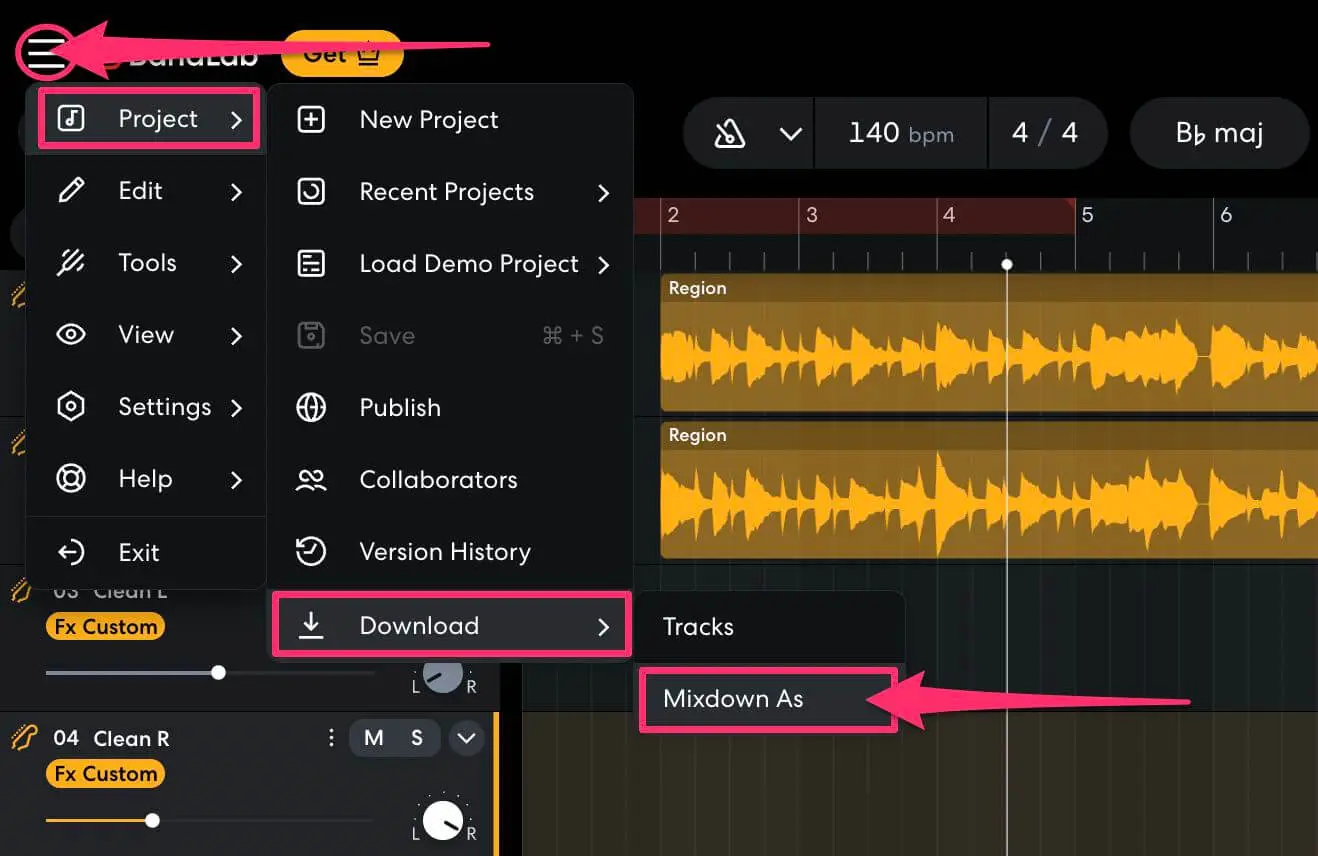
If your MV uses only 60 seconds of a longer song, export the complete approved mix first. Choose the 60-second range during the video edit so the source audio remains traceable to one final master.
Use Stems to Build a Better Visual Cue Sheet
You do not need stems to make a music video, but they can make the cue sheet more accurate. Listening to the vocal, guitar, drums, or synth layers separately makes subtle entrances and exits easier to hear. Those moments can motivate a camera move, light change, cut, or character action.
For the video master, choose the highest-quality mixdown available in your download panel. Use individual tracks only when you need to isolate a vocal breath, guitar entrance, drum drop, or other cue that is difficult to hear in the full mix. Available options can differ between Web, iOS, and Android, so make the choice from the menu on the device you are using.
For After Closing, the isolated guitar makes the 22-second transition obvious, while the vocal stem reveals the quiet breath immediately before the chorus. Both cues become visual events in the storyboard.
Turn the Song into a Visual Brief
Lyrics should influence the story without being illustrated word for word. If every noun becomes a literal object on screen, the result often feels like a slideshow. Instead, define one emotional conflict and one visual rule that can evolve with the music.
For this case study:
- Emotional conflict: Maya is trapped between the life she has and several lives she imagines.
- Visual rule: security monitors reveal alternate choices before the real world does.
- Performance rule: Maya sings only during the chorus; earlier shots remain observational.
- Continuity anchors: the same face, short natural curls, silver ear cuff, dark green work jacket, store layout, monitor wall, and rainy blue-black night.
- Camera language: locked surveillance compositions for alternate lives, slow handheld movement for the real store, controlled close-ups during the chorus.
Copy-Ready 60-Second BandLab Music Video Brief
After Closing: cinematic Alternative R&B narrative-performance MV
Create a 60-second, 16:9 cinematic Alternative R&B music video for the uploaded final BandLab mixdown. Build one coherent story around the selected 0:00-1:00 section. Alternate restrained narrative shots with direct-to-camera performance only after the chorus begins.PROJECT CONTEXT
The song was created remotely by three collaborators in BandLab: Maya is the lead vocalist and lyricist, Theo is the producer, and Jules performs processed electric guitar. Preserve the final audio exactly. Do not add dialogue, crowd noise, sound effects, or a different vocal. Leave space for the full collaborator credits in the final end card.
STORY
Maya works alone during the final hour of a night shift in a small urban convenience store. At first, the security monitor wall shows the same store from ordinary camera angles. The monitor feeds gradually fall a few seconds behind her real movements. One screen then shows another version of Maya who is not wearing the store uniform. During the chorus, different monitors reveal believable alternate versions of her life: performing in a small club, walking through an airport at dawn, recording vocals in a bedroom studio, and sitting at a family dinner. These are not separate random characters. They are the same woman at the same age, with the same face and physical identity.
At the emotional peak, the alternate Maya in the club stops performing and looks directly through the security camera. She silently mouths the next lyric before the real Maya sings it. The monitors shut off one by one. In the final shot, Maya faces the glass entrance door. The store is reflected behind her, but none of the alternate lives remain. She makes a small, calm decision: removes her employee badge, places it beside the register, and walks out into the blue light before the last guitar note fades.
MAIN CHARACTER LOCK
Maya is a 27-year-old Black woman with warm deep-brown skin, an oval face, dark brown eyes, short natural curls with a soft side part, and a small silver ear cuff on her left ear. In the real convenience store, she wears the same dark forest-green work jacket over a charcoal crew-neck shirt, straight black trousers, and simple black sneakers. Keep her face, age, skin tone, hairstyle, ear cuff, body proportions, and clothing construction consistent in every store shot.
The alternate-life versions must still be unmistakably Maya. Change only the situation and clothing required by that life: a minimal black stage outfit in the club, a practical gray travel coat at the airport, a faded blue sweatshirt in the bedroom studio, and a rust-colored knit top at the family dinner. Never change her facial structure, hair length, age, or body shape.
LOCATION LOCK
Use one realistic independent convenience store at 2:10 AM. The store has narrow cream-colored aisles, cool fluorescent ceiling lights, a red counter edge, one glass entrance door, rain on the windows, and a four-screen security monitor wall behind the register. Preserve the aisle layout, counter, door, monitor positions, color palette, and exterior night across all store shots.
VISUAL STYLE
Photorealistic contemporary music video, restrained Alternative R&B mood, subtle 35mm film texture, natural skin detail, soft highlight roll-off, deep blue-black night outside, pale fluorescent green inside, restrained red accents from packaging and the counter. Avoid glossy cyberpunk neon, aggressive glitch effects, beauty-commercial skin smoothing, fantasy costumes, and random location changes.
SHOT FLOW
0:00-0:08 — 35mm locked wide shot from the back corner of the store. Maya stands behind the register under quiet fluorescent lights. She looks toward the empty aisles, then down at the counter. Establish the monitor wall and rainy entrance door in one readable composition.
0:08-0:15 — 50mm side tracking shot. Maya walks along one aisle and straightens products. The nearest monitor in the background shows her movement two seconds late. Keep the action small and realistic.
0:15-0:22 — 85mm close-up of Maya at the register. She notices the delayed feed. Her expression shifts from tired concentration to alert uncertainty. No exaggerated fear.
0:22-0:31 — Slow push toward the monitor wall as the processed guitar enters. Three screens still show the store. The fourth shows the same Maya in a black stage outfit waiting under a single warm spotlight in a small club. Cut back to the real Maya watching.
0:31-0:38 — Chorus begins. Medium frontal performance shot behind the register, 50mm lens. Maya sings directly to camera for the first time. The camera makes one slow controlled push-in. Monitor light flickers across her face without distorting it.
0:38-0:45 — Rhythmic sequence of four clear monitor views, each held long enough to read: Maya performing in the club, Maya walking through an airport at dawn, Maya recording vocals in a modest bedroom studio, Maya laughing at a family dinner. Match cuts should follow body position and gaze direction rather than using random transitions.
0:45-0:51 — Over-the-shoulder shot from behind the real Maya. The stage version stops singing, steps closer to the security camera, looks directly at Maya, and silently mouths the next lyric. Preserve both faces accurately.
0:51-0:56 — Tight close-up on the real Maya as she sings that lyric. The monitor screens switch off one by one behind her. Hold the final black screen for half a second.
0:56-1:00 — 35mm slow pullback toward the rainy glass entrance. Maya removes her employee badge, places it beside the register, crosses the store, and opens the door. End with her walking into cool early-morning light while her reflection briefly overlaps the dark store interior. Cut to black on the final guitar tail.
CAMERA AND EDITING RULES
Use locked surveillance framing only for monitor images. Use slow handheld or controlled dolly movement in the real store. Keep each shot focused on one main action. Do not use rapid spinning cameras, extreme wide-angle distortion, floating objects, duplicate people in the store, unreadable monitor compositions, or cuts unrelated to the music cues.
CONTINUITY RULES
Keep Maya's identity consistent in every version. Keep the store geography stable. The employee badge stays attached until the final shot. Rain continues outside throughout the video. The monitor wall always contains four screens in the same arrangement. Do not invent logos, brand names, subtitles, watermarks, or on-screen text. Reserve the final black frame for collaborator credits added during editing.
This brief is intentionally detailed enough to establish the full visual system. In production, generate the storyboard first and then shorten each shot instruction to the information needed for that clip.
Build the Full BandLab MV in SoulVid
Open the SoulVid AI Music Video Generator or select Music MV from the SoulVid creation screen. Start with the final BandLab mixdown and a concise version of the creative brief. Include the lyrics or song structure when available, and identify the exact 60-second range you want to visualize.
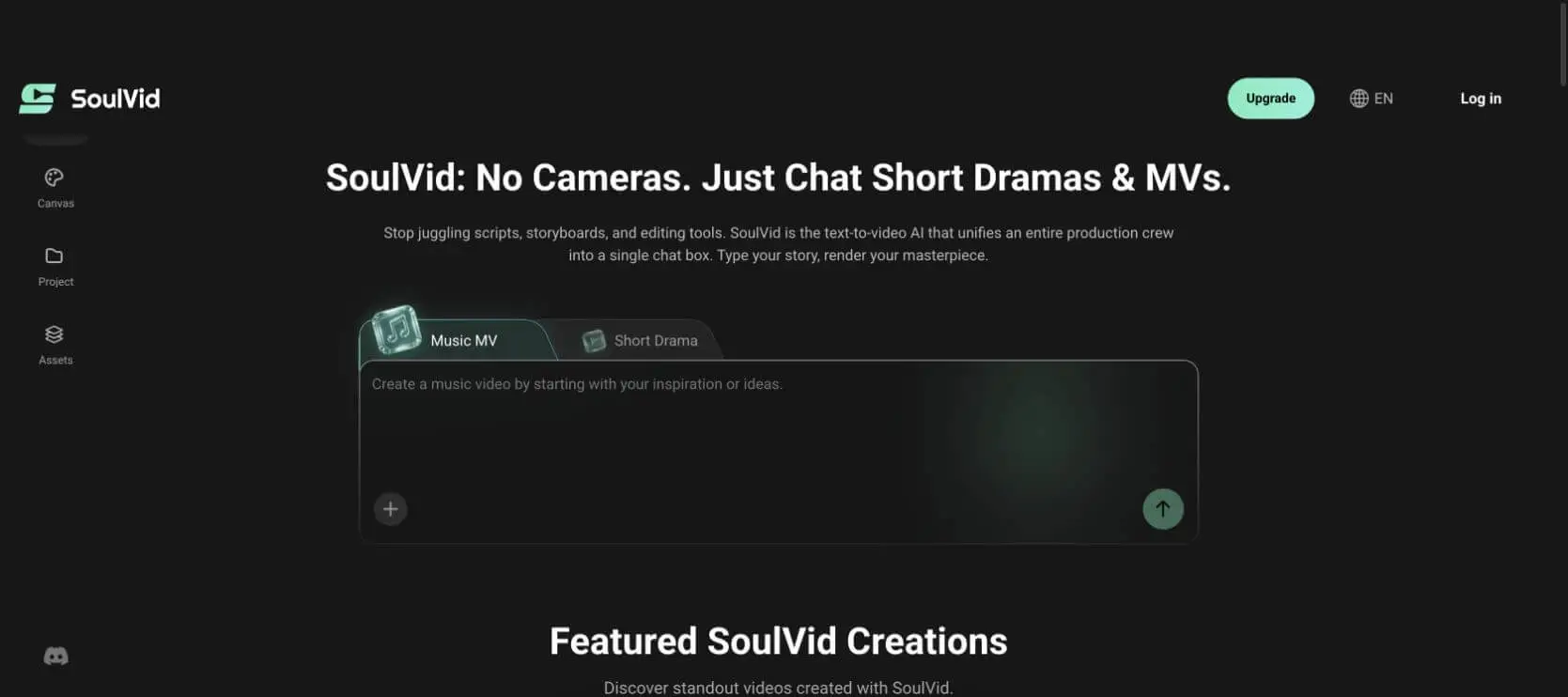
Do not paste only the lyric text and ask for "a cinematic video." Give the system the decision-making context that the audio alone cannot provide:
- Which song section the video uses
- The narrative conflict and ending
- When direct performance begins
- The lead character's fixed visual anchors
- The main location and recurring props
- The aspect ratio and publishing platforms
Convert the Brief into an Editable Storyboard
A storyboard should connect the written concept, image references, individual shots, audio, and final video. Review that structure before generating motion so expensive continuity problems are visible while they are still easy to change.
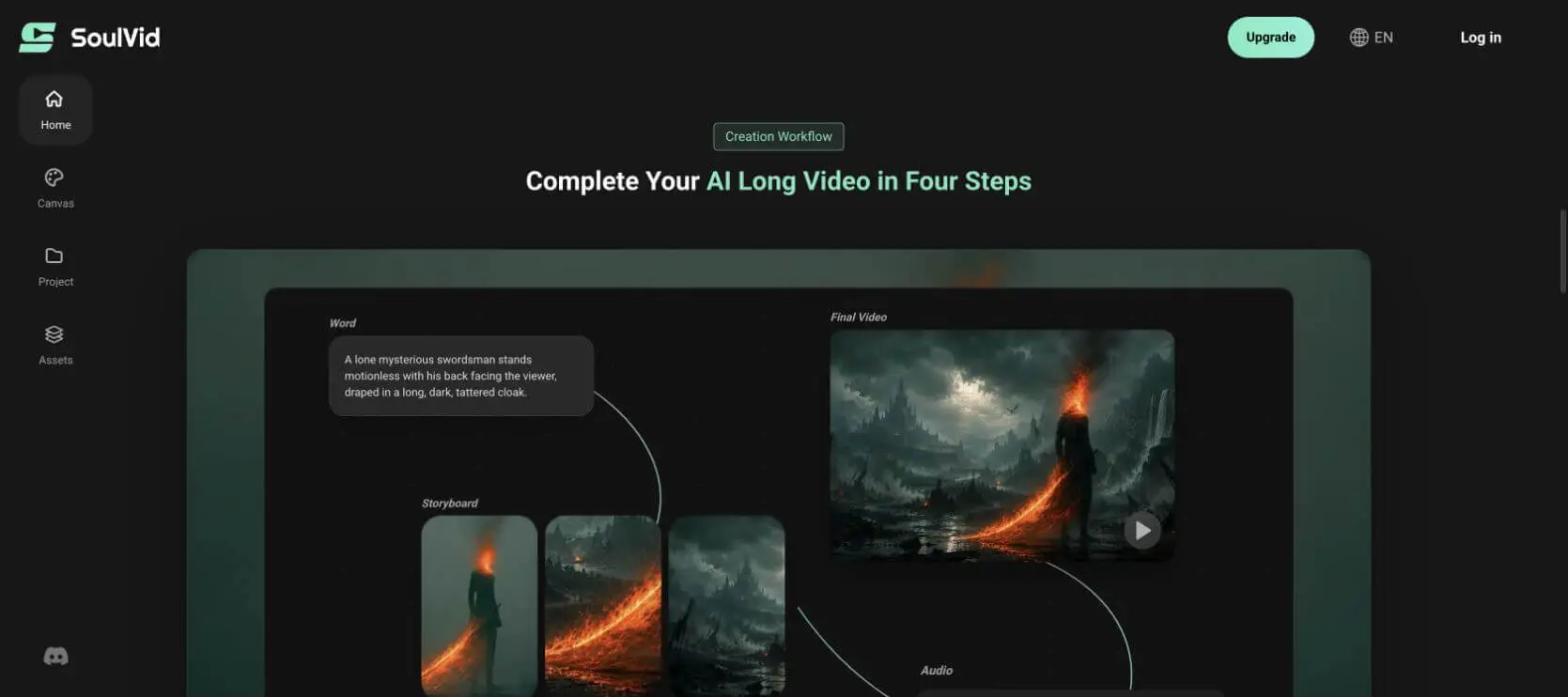
For a deeper shot-planning method, read the AI storyboard guide. If the alternate versions of Maya begin changing face or body shape, use the reference workflow from How to Keep Characters Consistent in AI Video before generating more clips.
Turn Your BandLab Song into a Storyboard
Upload the final mix, describe the visual story, and review the characters and shot order before committing to the full render.
Build Your BandLab Music VideoKeep Every Collaborator and Character Consistent
A collaboration has two kinds of continuity: visual continuity inside the MV and credit continuity around the release.
For visual continuity, approve one main Maya reference and one reference for each alternate outfit before animation. Keep the same facial identity across all references. Use one convenience-store layout reference, one monitor-wall layout, and one color palette. If a generated frame changes an anchor, repair the frame before using it as the basis of a video clip.
For collaborator continuity, maintain one credit sheet through every export. Confirm the artist name, song title, producer, featured musicians, cover art credit, video credit, and any sample or performance permissions. Add only claims the collaborators have approved.
Review the Storyboard Against the Final Mix
Play the final mix from the beginning while reading the storyboard shot by shot. Do not review the images silently; a beautiful sequence can still fail when the chorus arrives too early or the ending has no time to breathe.
Use this review checklist:
- Every shot begins on a specific vocal, instrument, lyric, or structural cue.
- The chorus creates a visible change from the verse.
- Each shot communicates one main piece of information.
- Maya, her alternate versions, the store, and the monitor wall remain recognizable.
- The final action resolves the story instead of merely stopping when the audio ends.
- Credits are readable and do not cover an essential final image.
If one section feels rushed, remove a shot before shortening every shot. Viewers need enough time to understand the monitor images and recognize that every alternate woman is Maya.
Export the MV and Social Cuts
Export one clean master before creating platform versions. For a 16:9 YouTube upload, keep the full convenience-store composition and monitor wall visible. For a 9:16 Reel, Short, or TikTok cut, reframe around Maya and the most important monitor rather than mechanically cropping the center of every wide shot.
Recommended deliverables for this case:
| Version | Duration | Format | Purpose |
|---|---|---|---|
| Main MV | 60 sec | 16:9 | Full narrative and collaborator release |
| Chorus cut | 20-30 sec | 9:16 | Performance, alternate-life reveal, and hook |
| Lyric teaser | 10-15 sec | 9:16 | One strong lyric over a readable visual moment |
| Silent preview | 6-10 sec | 1:1 or 4:5 | Looping announcement with title added in editing |
Listen to every exported version with headphones and phone speakers. Check the first and last frame, lip movement, monitor content, skin detail, text safe areas, compression, and credit spelling before publication.
Common Problems and FAQs
Common BandLab Music Video Problems
The Video Feels Like Unrelated AI Clips
Cause: every lyric line received a new location or visual metaphor. Fix it by returning to one conflict, one location system, and one recurring visual rule. Reuse the same character and store references in every relevant shot.
The Chorus Does Not Feel Bigger Than the Verse
Cause: shot scale, camera movement, lighting, and performance remain unchanged. Fix it by reserving direct-to-camera singing, wider emotional movement, and the alternate monitor lives for the chorus.
A Collaborator's Part Has No Visual Presence
Cause: the storyboard follows only the vocal. Mark instrumental entrances in the cue sheet. In After Closing, Jules's guitar announces the first alternate monitor, while Theo's full drum entrance triggers the chorus performance.
The Character Changes Between Alternate Lives
Cause: each outfit prompt accidentally describes a new person. Define Maya's facial identity once, keep one approved face reference, and describe clothing changes separately. Reject mismatched keyframes before animation.
The 60-Second Edit Starts or Ends Abruptly
Cause: the selected range ignores musical phrasing. Move the cut to a breath, pickup, downbeat, decay, or intentional silence. Add a short visual hold when the audio tail needs room.
Frequently Asked Questions
Can BandLab Make a Music Video?
Yes. BandLab Video Mix can combine recorded or uploaded phone footage with a track from your BandLab Library. It is suited to performance, lip-sync, freestyle, shoutout, and simple social-video workflows. A multi-scene narrative MV still requires separate story and shot planning.
Can I Download a BandLab Song for a Music Video?
Yes. BandLab provides mixdown downloads on Web and Mobile, with different format options by platform. Use the final approved mixdown as the audio master for the video and confirm that every collaborator has approved the release.
Can BandLab Export Only the Chorus?
BandLab does not currently export only a selected project section. Export the complete mixdown, then select and trim the chorus during the video workflow.
Does BandLab Automatically Generate Lyric Videos?
BandLab offers AI Lyric Video Generation inside Video Mix on Android and iOS. It extracts lyrics from a track and adds synchronized overlays. Check the current token cost and make sure the selected section contains lyrics before generating.
Do I Need Stems to Make a BandLab Music Video?
No. The final mixdown is enough for a standard MV. Stems are helpful when you want to identify quiet instrument entrances, vocal breaths, drops, or transitions for a more accurate cue sheet.
What Is the Best Workflow for a Full BandLab Music Video?
Finish and approve the song in BandLab, download the final mixdown, mark the song structure, write one visual premise, build a storyboard, approve character and location references, generate or film each shot, review the sequence against the final audio, and export the master plus social cuts.
Give the Finished Song a Visual Story
Bring your BandLab mixdown, lyrics, and one clear premise to SoulVid. Plan the story and storyboard before generating the full MV.
Create an AI Music Video