A strong product photo proves what an item looks like. A strong product video shows how it moves, fits into a person's life, and deserves attention before the viewer scrolls away. AI can help you create that motion without arranging a full shoot, but the result still needs a product brief, a shot plan, and a careful review.
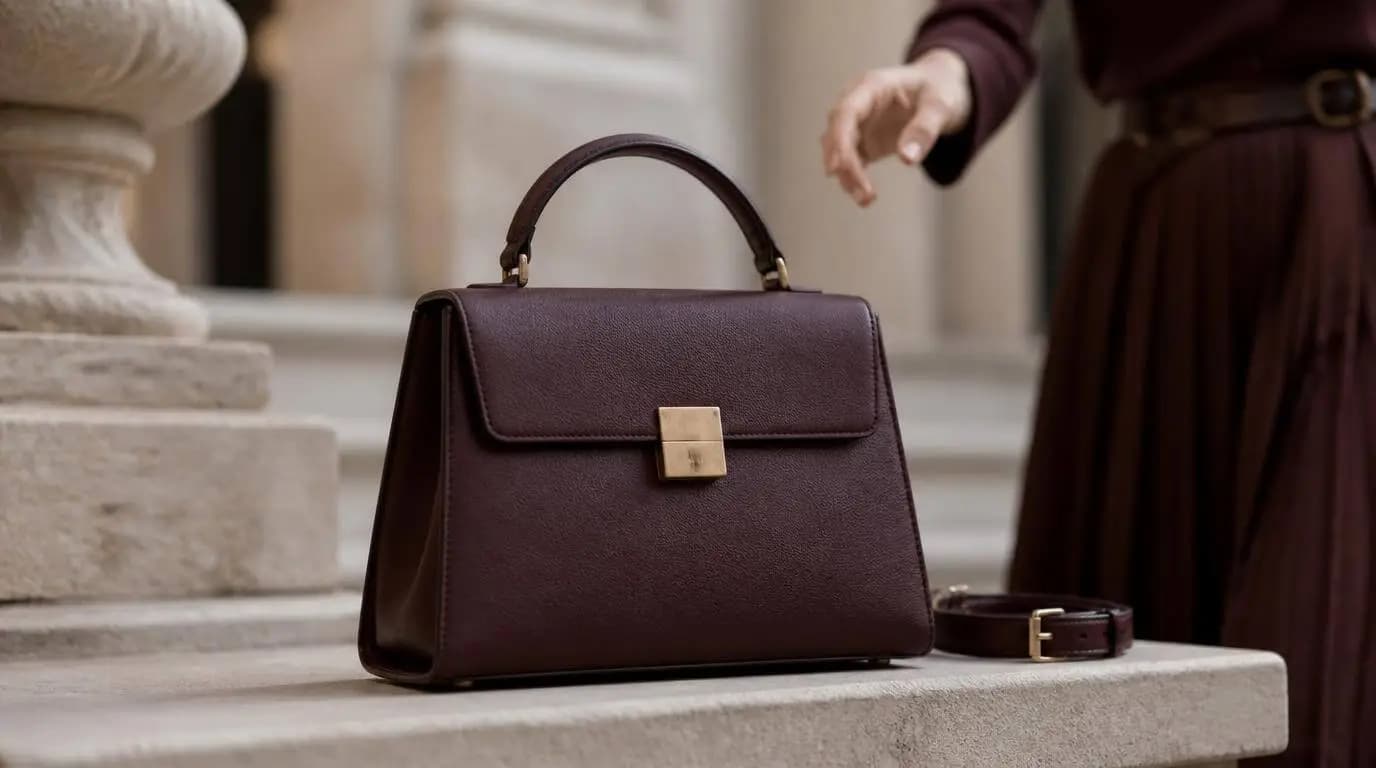
This guide explains how to make an AI product video from product images, from choosing the right format to generating and repairing individual shots. The running example is a 30-second vertical fashion ad for a structured leather shoulder bag, complete with a detailed prompt you can adapt for clothing, shoes, bags, and accessories.
To make an AI product video, prepare clean product references, define one audience and one message, turn the idea into a short storyboard, generate each shot with the same product and character anchors, review product accuracy, then assemble platform-ready versions. Do not ask one long generation to solve the entire video at once.
What Is an AI Product Video?
An AI product video uses generative video, image animation, synthetic scenes, or AI-assisted editing to present a product in motion. The input can include packshots, lifestyle photos, a product description, a creative brief, a storyboard, reference video, music, or voice.
The useful distinction is not whether every pixel is generated. It is what job the video performs.
| Format | Main job | Typical length | Useful channels |
|---|---|---|---|
| Product showcase | Reveal shape, material, and design | 6-15 seconds | Product pages, launches, social posts |
| Lifestyle video | Show the product being worn or used | 10-30 seconds | Reels, TikTok, Shorts, paid social |
| Product demo | Explain a feature or interaction | 15-60 seconds | Product pages, marketplaces, sales pages |
| Video ad | Connect a benefit to a clear action | 6-30 seconds | Paid social, retargeting, campaigns |
| Brand film | Build a visual world around the product | 15-60 seconds | Launches, homepages, presentations |
For clothing, shoes, and bags, a lifestyle product video is often the most useful starting point. A person can show scale, fit, movement, capacity, and styling in ways a floating packshot cannot.
What You Need Before You Start
AI generation becomes more reliable when the creative input is specific. Collect the following before writing the first prompt.
Clean product references
Use several sharp images of the exact item you want to feature:
- A front or three-quarter product image
- A side and back view
- Close-ups of the material, hardware, stitching, sole, zipper, or closure
- An interior view when capacity or construction matters
- A lifestyle image that shows the intended scale
Remove distracting props and conflicting backgrounds when possible. If the reference set shows different colorways or hardware finishes, the model may blend them together.
Approved product facts
Write down the claims the video is allowed to communicate. Keep verified facts separate from visual mood. "Full-grain leather" is a product claim. "Quiet confidence for a busy city morning" is a creative direction. Do not let AI invent materials, certifications, dimensions, prices, or performance claims.
Brand and audience direction
Define the target customer, brand tone, color palette, typography, and places where the video will appear. A luxury launch film and a direct-response TikTok ad can feature the same bag but require different pacing, framing, and text.
How to Make an AI Product Video Step by Step
Step 1: Choose one conversion goal
Give the video one job. For example:
- Introduce a new bag silhouette
- Show how a jacket moves while walking
- Demonstrate what fits inside a work tote
- Turn a product image into a six-second social hook
- Create three aspect-ratio variations for a launch
The running example has one goal: present a structured leather shoulder bag as an elegant everyday companion for work and city travel.
Step 2: Write a focused creative brief
A product video brief should identify the product, audience, promise, setting, visual style, and final action. Keep it concrete enough to direct a shoot.
Create a 30-second vertical fashion video for a structured oxblood leather shoulder bag. Follow one professional woman through a calm city morning. Show how the bag completes her outfit, moves naturally while walking, opens easily, and holds daily essentials. The tone is understated, modern, and premium rather than flashy.
This sentence is more useful than "make a luxury bag commercial" because it defines the customer, product role, action, and mood.
Step 3: Build the storyboard before generating video
Plan the video as a sequence of small jobs. Each shot should reveal something new about the product. A storyboard also lets you approve the composition before spending generation credits.
For a deeper planning method, use the AI storyboard guide to define shot size, camera movement, continuity, and scene order.
| Time | Shot | Product job |
|---|---|---|
| 0-4 sec | Bag on a stone bench, model enters frame | Establish shape and color |
| 4-9 sec | Model picks up the bag and adjusts the strap | Show scale and handling |
| 9-14 sec | Side tracking shot while she walks | Show movement and styling |
| 14-19 sec | She turns, sits, and places the bag beside her | Show silhouette from another angle |
| 19-25 sec | She opens the bag and removes daily essentials | Show closure and capacity |
| 25-30 sec | Hero close-up and final over-shoulder exit | End on material and brand memory |
Turn product photos into a shot plan
Bring your product references and campaign idea to SoulVid, then organize the product, model actions, camera movement, and scene order before generating.
Build Your Product Video StoryboardStep 4: Lock the product and character anchors
Models can change a bag's proportions, add pockets, move a clasp, or alter a logo between shots. Repeat a small set of visible anchors in every generation.
- Product: structured trapezoid silhouette, oxblood leather, one top handle, detachable shoulder strap, brushed gold rectangular clasp, no exterior pockets
- Character: adult woman in her early 30s, shoulder-length dark brown hair, charcoal tailored coat, ivory knit top, black straight-leg trousers, low black leather shoes
- Environment: pale limestone architecture, muted city street, soft overcast morning light
- Camera: restrained fashion-film movement, realistic 35mm and 50mm lens language, no extreme wide-angle distortion
Reference images remain more important than adjectives. Use the same approved product images and character reference across all six shots.
Step 5: Write prompts for individual shots
Use one shared direction for the whole project, then give every shot its own subject action, camera move, framing, duration, and ending position. The cinematic prompt guide includes additional camera language when you need a controlled push-in, tracking shot, orbit, or close-up.
The complete example below is intentionally detailed. It can serve as the project brief in a storyboard-led tool such as the SoulVid AI Commercial Video Generator. Generate the shots separately when the selected video model has a shorter duration limit, then review and assemble them in order.
Copy-Ready 30-Second Fashion Product Video Prompt
Structured leather shoulder bag with a model, six-shot vertical fashion ad
Create a 30-second, 9:16 vertical fashion product video built from six connected shots. The product is the hero in every shot. Use the uploaded front, side, back, hardware, interior, and lifestyle reference images as the source of truth.CAMPAIGN GOAL
Present the bag as a refined everyday companion for a professional woman moving through a calm city morning. Communicate structure, material quality, comfortable carrying, easy access, and practical capacity without using spoken dialogue or unsupported product claims.
PRODUCT LOCK
Feature the exact same structured shoulder bag in every shot. It has a compact trapezoid silhouette, smooth oxblood leather, a firm flat base, one short top handle, one detachable shoulder strap, clean edge paint, subtle tonal stitching, and one brushed gold rectangular clasp centered on the front flap. The back is plain. There are no exterior pockets, tassels, chains, studs, monograms, or decorative charms. Preserve the exact proportions, oxblood color, leather texture, handle attachment points, strap width, stitching, clasp position, hardware finish, and interior construction shown in the references. Preserve an existing real logo only when it is clearly visible in the reference. Never invent, replace, enlarge, distort, or misspell a logo.
CHARACTER LOCK
Use the same adult woman in every lifestyle shot. She is in her early 30s, with shoulder-length dark brown hair in a smooth natural blowout, warm medium skin, and understated makeup. She wears a charcoal tailored knee-length coat left open, an ivory fine-knit top, black straight-leg trousers, and low black leather shoes. Her styling is polished, contemporary, and believable for a weekday city morning. Keep her face, age, body proportions, hairstyle, outfit, shoes, and jewelry consistent. Use natural hands with five fingers and physically believable contact with the handle, strap, clasp, and personal items.
ENVIRONMENT AND ART DIRECTION
Set the film around pale limestone architecture, a quiet covered walkway, and a minimal stone bench in a modern European-style business district. Use soft overcast morning light with gentle directional highlights on the leather and brushed gold hardware. The palette is oxblood, charcoal, ivory, limestone, and restrained green from distant planters. The mood is elegant, calm, useful, and self-assured. Avoid a glossy nightclub look, excessive luxury cliches, crowded streets, heavy orange grading, neon light, or fantasy environments.
CAMERA AND MOTION RULES
Use realistic premium fashion cinematography with 35mm and 50mm lens language, shallow but not extreme depth of field, controlled exposure, natural motion blur, and stable product geometry. Camera movement should be slow and intentional: a gentle push-in, a short lateral track, a restrained half orbit, and one macro detail move. Keep the bag inside the central safe area for vertical platforms. Do not use a spinning camera, crash zoom, speed ramp, whip pan, impossible reflection, floating product, or sudden focal-length change. Every shot must begin and end on a stable composition that can be edited cleanly.
SHOT 1 - 0:00 TO 0:04 - PRODUCT ARRIVAL
Begin with the bag standing upright on a pale limestone bench in a clean three-quarter view. The flap is closed and the shoulder strap rests naturally beside it. Start on a close detail of the brushed gold clasp and leather grain, then perform a very slow four-second pullback to reveal the full silhouette. The woman enters softly in the background during the final second, still slightly out of focus. Keep the product perfectly still and accurately shaped. End with her right hand approaching the top handle but not yet touching it.
SHOT 2 - 0:04 TO 0:09 - PICKUP AND STRAP ACTION
Continue from the same bench and lighting. Frame a medium close shot from waist height. The woman wraps her right hand naturally around the top handle, lifts the bag once with believable weight, steadies the base briefly with her left hand, then guides the shoulder strap onto her right shoulder. The leather should flex only slightly and return to its structured form. The clasp stays centered and closed. Use a subtle left-to-right camera slide that reveals the side profile and strap attachment. End with the bag resting securely under her right arm and her hands relaxed.
SHOT 3 - 0:09 TO 0:14 - WALKING PROFILE
Cut to a full-body side tracking shot under the limestone walkway. The woman walks at a natural, confident pace from left to right. The bag hangs from her right shoulder at hip height and responds to each step with small, physically realistic movement. It must not bounce excessively, stretch, collapse, or change size. She lightly touches the strap once with her right hand while looking ahead, then allows her arm to swing naturally. Keep the product side and three-quarter front visible as the camera tracks parallel to her. Background pedestrians, if any, remain distant and soft. End as she slows near the stone bench.
SHOT 4 - 0:14 TO 0:19 - TURN, SIT, AND PLACE
Use a restrained half-orbit from a medium-wide front angle. The woman turns toward the bench, the coat moves naturally, and the bag remains on her shoulder without clipping through her arm or clothing. She sits, removes the strap with her right hand, catches the top handle, and places the bag upright beside her in one continuous, unhurried action. The base lands flat and the bag keeps its original silhouette. Let her glance briefly at the product with a calm, satisfied expression. End on a balanced composition showing her seated beside the bag.
SHOT 5 - 0:19 TO 0:25 - OPENING AND CAPACITY
Move to an overhead three-quarter close shot focused on her hands and the bag. She releases the exact rectangular clasp, lifts the flap, and opens the bag without changing its construction. Show a neat neutral interior matching the reference. She removes three realistic daily items one at a time: a slim dark phone, a compact sunglasses case, and a small ivory card holder. Do not reveal impossible extra space. She returns the card holder, lowers the flap, and closes the same clasp. Use a slow controlled push-in during the action. Keep her fingers, the hardware, all edges, and the product logo stable and legible.
SHOT 6 - 0:25 TO 0:30 - MATERIAL HERO AND EXIT
Begin with a macro close-up moving slowly across the oxblood leather grain, tonal stitching, handle base, and brushed gold clasp. Transition through a clean match cut to the woman standing with the bag carried by the top handle. She takes two steps away, turns her upper body slightly so the front of the bag faces the camera, gives a subtle confident half-smile, then continues toward the bright end of the walkway. Finish on a stable product-forward frame with negative space in the upper left for optional campaign copy. Do not generate text inside the video. Hold the final composition for at least half a second.
EDITING AND SOUND DIRECTION
Use clean straight cuts or motivated match cuts. Let the motion of the hand, strap, coat, or bag connect adjacent shots. Use understated contemporary music with soft percussion and a warm bass pulse. Add subtle location sound: one heel step, a quiet leather movement, and a soft clasp click. Do not add narration unless supplied separately. The product must remain visually dominant even when the model is full-body.
OUTPUT
9:16 vertical, 1080 x 1920, 24 fps, approximately 30 seconds total. Keep the product, face, and hand actions clear on a phone screen. Preserve safe space for platform controls and optional text overlays. Use realistic motion, coherent lighting, and consistent color across all six shots.
NEGATIVE CONSTRAINTS
No product redesign, no color shift, no changed dimensions, no extra pockets, no added zipper, no missing strap, no chain strap, no duplicated handles, no warped clasp, no fake logo, no misspelled text, no melting leather, no liquid surface, no floating bag, no weightless motion, no object passing through hands or clothing, no extra fingers, no fused fingers, no changing face, no changing outfit, no changing hairstyle, no sudden age change, no extreme body proportions, no exaggerated runway pose, no fast dance movement, no crowded background, no neon cyberpunk lighting, no aggressive camera shake, no fisheye distortion, no excessive lens flare, no watermark, no subtitles, and no generated brand slogan.
Step 6: Generate the anchor shots first
Do not begin by generating all six shots at full length. Test the shots that carry the most visual risk:
- Shot 1 tests whether the product itself is accurate.
- Shot 2 tests hand contact, scale, and strap behavior.
- Shot 5 tests the clasp, interior, capacity, and small details.
Approve those anchors before generating the easier walking and transition shots. If the product is already wrong in the packshot, more motion will not fix it.
Step 7: Review product accuracy before visual style
Watch every generated clip once at normal speed and once frame by frame. Compare it with the reference images.
- Does the silhouette stay the same from the first frame to the last?
- Are the color, material, stitching, and hardware consistent?
- Does the strap attach at the correct points?
- Does the product keep a believable scale next to the model?
- Do the hands make physical contact without merging into the product?
- Does the opening action match the real construction?
- Are all visible claims, logos, and text accurate?
Regenerate or revise the weak shot rather than accepting a continuity error because the lighting looks attractive. In a storyboard-led workflow, you can keep the approved scenes and replace only the one that drifted.
Step 8: Assemble and export platform-ready versions
Build the 30-second master first. Then create shorter versions from approved shots:
- Six-second hook: product close-up, pickup, walking profile, final hero
- Fifteen-second social ad: pickup, walking, opening, final hero
- Product-page loop: packshot, half orbit, material detail
- Story format: full 30-second 9:16 sequence with safe text areas
Do not simply crop a horizontal master after the edit. Plan the product position and model movement for each aspect ratio so important details remain clear behind interface controls.
Common AI Product Video Mistakes
Asking one prompt to create the whole campaign
Long prompts provide direction, but they do not remove the need for shot-level control. Generate a planned sequence and review it scene by scene.
Mixing different versions of the product
Do not upload several seasonal colors, prototype designs, or packaging versions unless the video intentionally compares them. One approved reference set should define one product.
Hiding the product inside a beautiful scene
Atmosphere should support the item, not compete with it. If the viewer remembers the architecture but cannot describe the bag, the product video missed its job.
Trusting generated logos and text
Small packaging text and logos remain fragile in generative video. Use clean product renders for critical detail shots and add campaign copy during editing rather than asking the video model to write it.
Skipping rights and disclosure checks
Use product assets, models, voices, music, fonts, and references you own or have permission to use. Do not create a misleading fit, material, capacity, or performance demonstration. Follow the AI-content and advertising rules that apply to the platform and market where the video will run.
Turn Product References into an Editable Video Workflow
An AI product video is easier to direct when the references, storyboard, generated shots, and revisions remain connected. SoulVid lets you bring product images, brand assets, video, audio, and creative direction into one commercial workflow, review the plan before rendering, and revise individual scenes instead of restarting the full video.
Start with the product, not a blank timeline.
Bring your product references and campaign idea to SoulVid, then shape the storyboard, shots, and platform versions in one connected workflow.
Create an AI Product Video