The hardest part of making an AI short film is rarely generating one beautiful shot. It is keeping the story, character, location, sound, and pacing inside the same film a minute later. Ask a model to "make a suspense short" in one step, and faces change, rooms rearrange themselves, props disappear, or every shot looks polished but fails to connect.
This guide uses a 75-second suspense story called Don't Open the Door to show how to make an AI short film. We will move from a one-sentence idea to a script, character and location references, an eight-shot storyboard, keyframes, shot prompts, voices, sound design, and a final edit. The example deliberately uses one visible character, one apartment, one door, and one phone so you can focus on storytelling and continuity instead of too many variables.
To make a complete AI short film, limit the story to one controllable event, then divide the script into shots that can be generated and repaired independently. Lock the character, clothing, location, and important props first. Build a storyboard and keyframes, generate action, dialogue, and sound shot by shot, then use editing and a continuity review to turn the clips into a film viewers can follow.
An AI Short Film Is Not Generated All at Once
Current video models are better at completing one clearly defined shot than maintaining character, spatial, and story continuity across 60 to 90 seconds in a single generation. A controllable AI filmmaking workflow works more like a small production crew: write the script, establish character and location references, plan every shot, and only then generate video and sound.
| Stage | Question to solve | Output for this example |
|---|---|---|
| Story limit | What is this short actually about? | A woman receives a warning from tomorrow |
| Script | What happens, and when? | About 75 seconds and eight story beats |
| Visual bible | Which details cannot change? | Character, apartment, and prop references |
| Storyboard | How does each shot reveal information? | An eight-shot timeline and composition plan |
| Video generation | How do the character and camera move? | A separate action prompt for every shot |
| Sound and edit | How does suspense build? | Future voice, knocking, and a cut-to-black ending |
This approach adds a few planning steps, but it lets you regenerate one failed shot instead of rebuilding the entire film because the final five seconds went wrong.
The Example: Don't Open the Door
It is 11:47 PM. A woman in her early thirties is alone in her apartment when her phone receives a voice message from her own number. The date on the message is tomorrow.
Her recorded voice warns her:
Someone will knock in a few seconds. No matter whose voice you hear, do not open the door and do not answer.
When the message ends, three knocks sound at the door. Then her own voice calls from the hallway: "It's me. Open the door." She looks through the peephole. No one is there, but the handle begins to turn. When she replays the message, she hears her present breathing and footsteps recorded before they happen. She realizes she must record the same warning and send it to yesterday.
The phone displays "Sent to yesterday, 23:47." The hallway knocking stops. She relaxes for one second, then a final heavy knock comes from inside the apartment. Cut to black.
This story is practical for AI production because it needs only one visible character, one primary location, and a few fixed props. Suspense comes from sound, reaction, and the order of information, not crowds, fights, or complicated location changes.
Step 1: Reduce the Story to a Controllable Scope
A short film is not a feature played faster. A 60- to 90-second story usually works best with one conflict, one turn, and one ending.
The story spine for Don't Open the Door fits into three sentences:
- Conflict: A woman receives a warning from tomorrow telling her not to open the door.
- Turn: Her own voice appears outside, while the recording predicts her present actions.
- Ending: She sends the warning to yesterday, only to discover the real danger may already be inside.
If one concept includes three characters, five locations, two chases, and a complete mythology, remove anything that does not change the central turn. The shorter the AI film, the more generation budget should go to the images viewers will remember.

Step 2: Write the 75-Second Short Film Script
A script should describe information viewers can see or hear, not only what a character thinks. This version divides the story into eight beats that map directly to the storyboard.
| Time | Picture and sound | Story job |
|---|---|---|
| 0-6 sec | Night apartment, phone reads 23:47, woman sits alone | Establish time, character, and isolation |
| 6-14 sec | A voice message arrives from her own number, dated tomorrow | Introduce the impossible event |
| 14-23 sec | Her future voice warns her not to open the door | Define the rule and danger |
| 23-33 sec | Three knocks, then her own voice outside | Make the warning come true |
| 33-44 sec | Empty peephole view, door handle turns | Raise the threat without showing a creature |
| 44-55 sec | The replay contains her breathing and steps before they happen | Prove the time anomaly |
| 55-67 sec | She records the same warning and sends it to yesterday | Force the character to act |
| 67-75 sec | Send confirmed, one knock inside, cut to black | Complete the loop and reveal the final turn |
Keep dialogue short enough for the audience to read the image. This story only needs the future warning, one line from outside, and the warning the protagonist records again.

Step 3: Build Character, Location, and Prop References
Character consistency does not come from repeating "the same woman." It comes from a set of visible traits that can be reused every time. The location needs the same treatment: the door position, wall color, light direction, and furniture relationships must stay fixed.
Protagonist reference
- Adult East Asian woman in her early thirties
- Straight dark brown hair below the shoulders, natural right-side part
- Dark brown eyes, slightly long face, minimal makeup
- Charcoal knit cardigan, ivory T-shirt, and dark trousers
- No clothing, hairstyle, jewelry, or makeup changes
- Performance moves from relaxed to confused, alert, and restrained fear
Apartment reference
- Small modern apartment at night with cool city ambience
- Warm table lamp as the main interior light
- Dark gray front door on the right side of the living room with a silver horizontal handle
- Wood dining table on the left with only a black phone and clear glass
- No window behind the door; a narrow white hallway outside
Prop reference
The phone must remain the same black slab smartphone. The on-screen time, message date, and send status are story clues, so treat phone close-ups as separate shots. Do not ask the model to create perfect interface text while also generating a complex character performance.
For a fuller reference workflow, use the AI character consistency guide to create a neutral front view, three-quarter view, and essential expressions before storyboarding.
Step 4: Divide the Script into Eight Generatable Shots
A storyboard determines more than what appears in frame. It defines shot size, camera position, character action, and the ending state that connects to the next clip.
| Shot | Framing and camera | Main action | Ending state |
|---|---|---|---|
| 1 | 35mm medium-wide, slow push-in | Woman sits at table and looks toward vibrating phone | Hand reaches toward phone |
| 2 | 50mm phone close-up, locked camera | Screen shows her number and tomorrow's date | Finger presses play |
| 3 | 85mm face close-up, extremely slow push | Confusion hardens as she hears the warning | First knock sounds |
| 4 | 35mm side medium shot, subtle handheld feel | She turns to the door and stands after three knocks | Voice speaks outside |
| 5 | 50mm over-shoulder track to peephole | She approaches; hallway is empty | Silver handle begins to turn |
| 6 | 85mm alternating phone and face close-ups | Replay reveals her breathing before it happens | She looks at record button |
| 7 | 50mm medium close-up, locked camera | She records the same warning in a low voice | Screen shows sent to yesterday |
| 8 | 35mm slow pullback | She faces the door as the hallway goes quiet | One knock inside, immediate cut to black |
If shot planning is new to you, the AI storyboard guide explains how to give every shot one main piece of information.

Turn the story into an editable storyboard
Enter the story, character, and ending direction in SoulVid, then review the script, relationships, and shot order before deciding which clips to generate.
Build an AI short film storyboardStep 5: Generate Keyframes Before Adding Motion
A keyframe is the most important still image in a shot. Approve the character, composition, clothing, location, and props before sending that frame into an image-to-video model. This is usually more reliable than asking text-to-video to invent everything at once.
The first shot keyframe prompt can read:
Shot 1 keyframe prompt
Photorealistic cinematic still, a small modern apartment at 11:47 PM, one adult East Asian woman in her early 30s sitting alone at a wooden dining table, straight dark brown hair below the shoulders with a natural right-side part, charcoal knit cardigan over an ivory T-shirt, dark trousers. A black smartphone vibrates beside a clear water glass. Warm table lamp on the left, cool blue city light from outside, dark gray front door on the right side of the room with a silver horizontal handle. Restrained psychological thriller, realistic skin, 35mm lens, medium-wide composition, subtle shadows. No other people, no text, no distorted hands.For the peephole sequence, first generate an over-the-shoulder composition of the woman facing the dark gray door, then create the empty hallway as a separate view. Do not ask one short clip to pass through the peephole, rotate the camera, reveal the hallway, and return to her face.
Step 6: Write Action and Camera Prompts Shot by Shot
A video prompt should state who moves, how they move, how the camera moves, and which elements must not change. Keep one main action in each shot whenever possible.
Shot 5 video prompt
Continue from the approved apartment and character reference. Use an over-the-shoulder tracking shot behind the same woman as she slowly approaches the dark gray front door. She keeps one hand close to her chest and leans toward the peephole without touching the handle. The camera follows at a restrained walking pace with subtle natural movement. The warm table lamp remains behind her on the left; cool light outlines the door. At the end of the shot, hold on the unchanged silver horizontal handle as it turns downward by itself a few centimeters. No visible intruder, no extra person, no new furniture, no costume change, no face distortion, no sudden camera spin.Final shot video prompt
Use the same woman, clothing, apartment layout, front door, lighting, and black smartphone. Begin with a medium shot as she looks down at the phone screen after sending the warning. The hallway knocking stops. Her shoulders release slightly, but she does not smile. The camera slowly pulls backward, revealing more darkness inside the apartment behind her while she remains facing the front door. She hears one heavy knock from somewhere inside the apartment and freezes without turning around. Hold for one second, then cut sharply to black. No creature, no visible attacker, no gore, no additional character, no changed room layout.The cinematic prompt guide contains more camera language, but do not make every shot orbit, zoom, or rush through space just to look technical. This story needs restraint, not a camera demo.
Step 7: Design the Voice from Tomorrow
Sound is the film's second character. The future message, the voice outside, and the warning recorded on screen should use the same base voice, with distance, compression, and emotion creating the differences.
Future message
Listen to me. Someone will knock in a few seconds. No matter whose voice you hear, do not open the door and do not answer. Do not trust whoever is outside.
The delivery is fast and unsteady but kept low. Add phone-frequency compression and faint noise so it sounds like a real received voice message.
Voice outside
It's me. Open the door.
Use the same voice, but make it calmer and closer to the door. The unnatural calm is more threatening than a scream.
On-screen recording
In shot 7, the protagonist repeats the future warning. She now understands the loop, so the first words are urgent while the ending gradually becomes the delivery heard in the original message. The audience should realize these were always the same recording.
Keep ambience simple: refrigerator hum, distant traffic, phone vibration, three knocks, metal movement in the handle, and the final knock from inside. Do not introduce horror music too early. A low tone can begin after the first knock.
Step 8: Build Suspense in the Edit
Suspense comes from letting the audience know slightly more than the character while still hiding the complete picture. Use these editing choices:
- Lead with sound: Let the first knock begin before the reaction close-up ends, then cut to the door.
- Keep the pause: Leave half a second of silence after the warning so viewers wait to see if it comes true.
- Fix the knock count: Preserve all three knocks clearly so the recording and reality match.
- Avoid overcutting: Stay on her reaction while she listens instead of constantly returning to the phone.
- Delay the reveal: Cut to black after the final knock without showing its source.
Add phone interface text during editing so "Tomorrow," "23:47," and "Sent to yesterday" remain accurate and readable. Do not entrust essential plot information to random text generated by the video model.
AI Short Film Continuity Checklist
After the first edit, review every shot against this list:
- Character: Do face shape, hair length, part, clothing, and age remain consistent?
- Space: Do the table, door, lamp, and hallway keep the same relationships?
- Props: Does the phone color, handle direction, or glass design suddenly change?
- Time: Do the phone date and 23:47 timeline support the story?
- Sound: Do the future message, hallway voice, and live recording sound like one person?
- Action: Does the hand position at the end of one shot connect to the next?
- Story: Can viewers understand the time loop without a production explanation?
If one shot fails, return to that shot's reference frame, action prompt, or ending pose. Do not regenerate stable close-ups and audio because the handle changed direction in one clip.
Complete Copyable AI Short Film Project Prompt
Use this prompt when creating the project to generate a script, character reference, and first storyboard. Continue using the shot-specific prompts above when generating individual clips.
Don't Open the Door project prompt
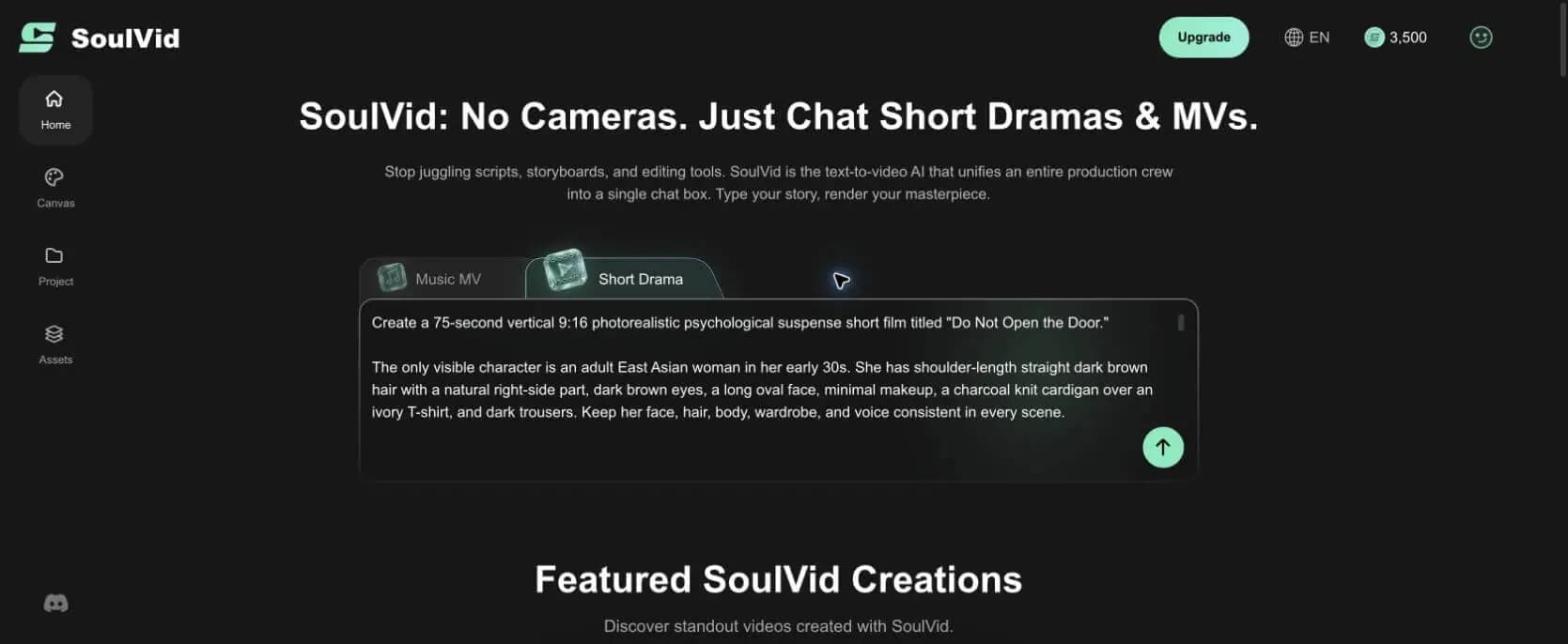
Create a photorealistic psychological suspense short film titled "Don't Open the Door," approximately 75 seconds long in a 9:16 vertical format.
The protagonist is one adult East Asian woman in her early 30s. She has straight dark brown hair below the shoulders with a natural right-side part, dark brown eyes, a charcoal knit cardigan over an ivory T-shirt, and dark trousers. She must be the only visible character. Keep her face, hair, clothing, and body shape consistent throughout the film.
The story takes place in a small modern apartment at 11:47 PM. Use a warm table lamp and cool city ambience. A dark gray front door with a silver horizontal handle is on the right side of the living room. A wooden dining table is on the left with only a black smartphone and a clear glass of water. Keep the apartment layout, door, lamp, table, and phone unchanged in every shot.
Story: The woman's phone receives a voice message from her own number, but the date is tomorrow. Her future voice warns, "Someone will knock in a few seconds. No matter whose voice you hear, do not open the door and do not answer." Three knocks sound, followed by her own voice outside saying, "It's me. Open the door." She checks the peephole. The hallway is empty, but the handle slowly turns. Replaying the message, she hears her present breathing and footsteps before they occur. She understands that she must record the same warning and send it to yesterday. After the phone displays "Sent to yesterday, 23:47," the hallway knocking stops, but one final heavy knock comes from inside the apartment. Cut immediately to black.
First produce a story summary, a 75-second script, a character reference sheet, apartment and prop references, and eight connected storyboard shots. For every shot, define duration, shot size, character action, camera movement, lighting, sound, and ending state. Then write one independently generatable image prompt and video prompt for each shot.
Use restrained, photorealistic psychological thriller cinematography with 35mm, 50mm, and 85mm lens language, slow push-ins, over-the-shoulder tracking, and locked close-ups. No gore, visible intruder, creature, extra character, clothing change, altered room layout, changed door, changed handle, changed phone, extreme wide-angle distortion, sudden camera spin, or meaningless effects. Make the time loop clear while preserving the final suggestion that the danger has entered the apartment.
From a Story Idea to an Editable AI Short Film
A good AI short film does not come from the longest prompt. It comes from a sequence of clear decisions: how small the story should be, which character details cannot change, what each shot accomplishes, when sound reveals information, and which mistake deserves a targeted regeneration.
SoulVid keeps the story idea, script, characters, assets, and storyboard inside one short drama workflow. Review the story and shot plan before generating video so you can preserve successful material and replace only the scenes that fail.
Turn your next story into a watchable short
Start with one story idea, then build the characters, script, storyboard, and shot-level videos into a complete short drama.
Start making an AI short film