The best UGC video makers for YouTube Shorts do not all make the same kind of content. Some generate an AI spokesperson from a script, some turn a product URL into dozens of ad variations, some help you direct a multi-shot product story, and others connect you with a real person who films the product at home.
The right choice depends on what viewers need to believe. A synthetic presenter can deliver ten hooks quickly. A real creator can physically use the product and speak from genuine experience. A storyboard-led tool is more useful when the Short needs several locations, product close-ups, and one consistent character instead of a single talking head.
We compared SoulVid, Arcads, Creatify, MakeUGC, and Billo using the same 30-second concept: a commuter shows how a lightweight sneaker makes a long city day more comfortable. We inspected their live public interfaces, workflow descriptions, and visible example galleries on August 24, 2026. SoulVid publishes this article and is included in the comparison, so each section also states what the product does not replace.
Choose SoulVid for a directed, multi-shot UGC-style Short with product references and an editable story plan. Choose Arcads when actor variety and fast ad experimentation matter most. Choose Creatify for product-URL automation and high-volume ecommerce variations. Choose MakeUGC for a straightforward script-to-avatar workflow with built-in finishing tools. Choose Billo when the content must come from a real human creator holding and using the actual product.
Best UGC Video Makers for YouTube Shorts at a Glance
| Tool | Best for | What the visible workflow produces | Main limitation |
|---|---|---|---|
| SoulVid | Directed multi-shot product stories | A brief becomes a planned sequence that can use product, character, motion, audio, and style references | Not a marketplace for hiring real creators |
| Arcads | Testing many AI actor ads | Talking-actor UGC, product showcases, captions, actor swaps, and ad variations | AI performances are not genuine customer testimonials |
| Creatify | Ecommerce teams starting from a product URL | UGC-style or polished ads, AI Shorts, and batches of creative variations | The workflow is optimized around advertising volume, not only organic storytelling |
| MakeUGC | Fast script-to-avatar production | Scripted actor videos with product-in-hand options, captions, music, B-roll, and trimming | Results can feel templated when the script, actor, and setting are not customized |
| Billo | Real product use and human credibility | Videos filmed by vetted human creators, with briefs, matching, and ad-ready delivery | Shipping, creator coordination, and turnaround make rapid iteration slower |
No tool can promise YouTube Shorts reach. Retention still depends on the opening, pacing, proof, payoff, and whether the content feels native to the channel. Tool marketing numbers are not a substitute for testing your own hook, audience, offer, and product.
What Makes a Good UGC Video Maker for YouTube Shorts?
UGC is a production style, not merely a vertical aspect ratio. The familiar phone camera, direct speech, casual setting, captions, and quick product demo work because they make the message easy to understand. They fail when every sentence sounds like an advertisement or the product appears only in the final two seconds.
A hook that works without context
The first frame should show a problem, surprise, or specific outcome. "These shoes are amazing" is weak because it could describe anything. "I stopped carrying backup flats to work" creates a question and points toward a visible product benefit.
Proof that survives a small screen
The viewer should see the product being worn, opened, applied, compared, or used. For shoes, that means a stable product close-up, a clear on-foot view, believable walking motion, and a specific comfort claim that the brand is allowed to make.
Natural performance
An actor should look toward the lens, pause where a person would pause, and handle the product with believable weight. A perfect face with rigid hands and an over-polished voice still looks synthetic. The best workflow lets you change the actor, voice, shot, or script without remaking every approved part.
A 9:16 edit built for Shorts
Create for vertical framing from the start. Keep the face, product, captions, and CTA away from interface overlays. A 30-second Short also needs visual change: a new angle, location, action, or piece of proof every few seconds.
Claims you can defend
AI can invent materials, reviews, prices, health benefits, and performance statistics. Lock approved product facts before generation. A synthetic avatar should not claim personal experience as fact, and a real creator should receive a brief that separates required talking points from claims they cannot honestly make.
The 30-Second Sneaker Short We Used as the Test
Every tool was considered against one practical brief so the comparison did not become a disconnected feature list.
| Time | Scene | Viewer job | Production risk |
|---|---|---|---|
| 0-4 sec | Handheld close-up on a crowded platform | Hook with the pain of a long commute | Generic or over-scripted opening |
| 4-9 sec | Creator shows the sneaker on foot | Establish the product immediately | Shoe shape or logo drift |
| 9-15 sec | Side view walking up station steps | Demonstrate flex and movement | Unnatural feet, gait, or contact |
| 15-21 sec | Selfie reaction at a city crosswalk | Deliver one human benefit | Robotic delivery or lip-sync errors |
| 21-27 sec | Product close-ups at a cafe | Show material, cushioning, and styling | Inconsistent color and construction |
| 27-30 sec | Creator walks away and turns back | Finish with CTA and brand memory | Product disappears behind the CTA |
The working line is: "I stopped carrying backup flats to work. These lightweight commuters flex when I move, feel cushioned through the afternoon, and still look clean after the train. Walk lighter all day." This is concise enough for a Short, but it still needs product proof and a performer who does not sound as if they are reading packaging.
SoulVid: Best for a Directed Multi-Shot UGC-Style Short
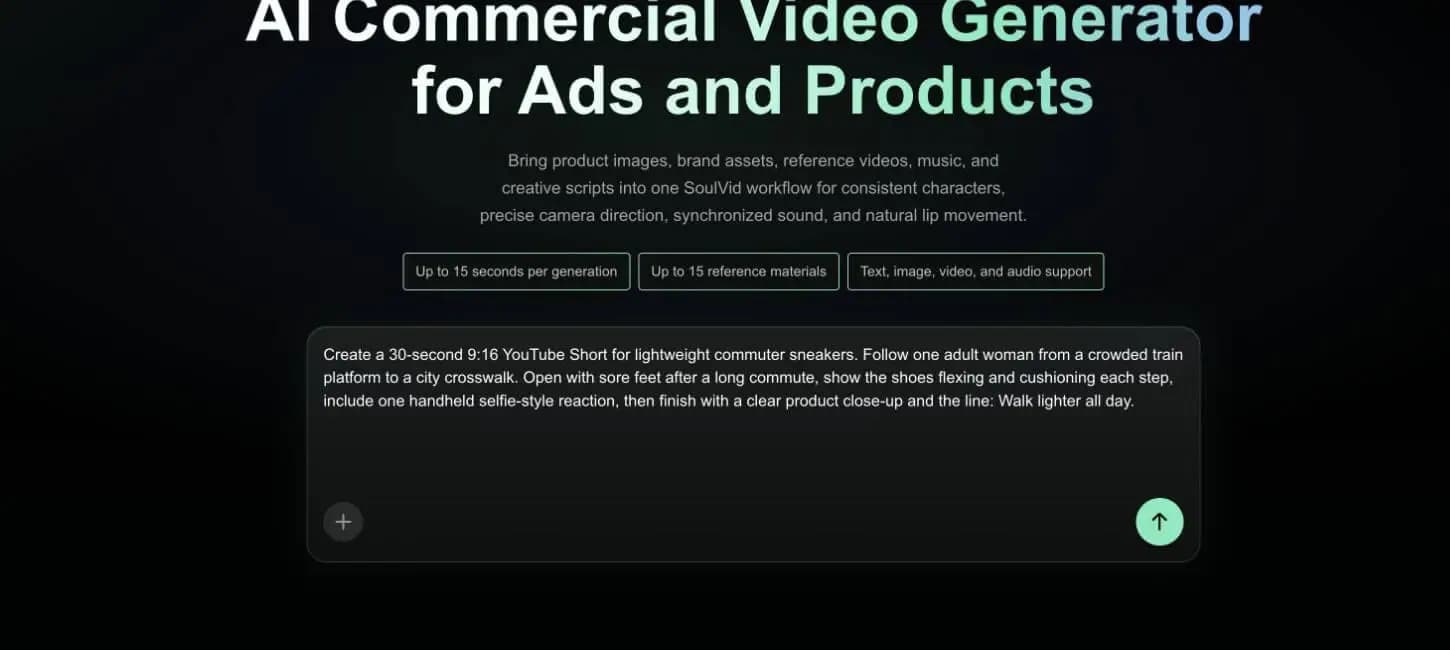
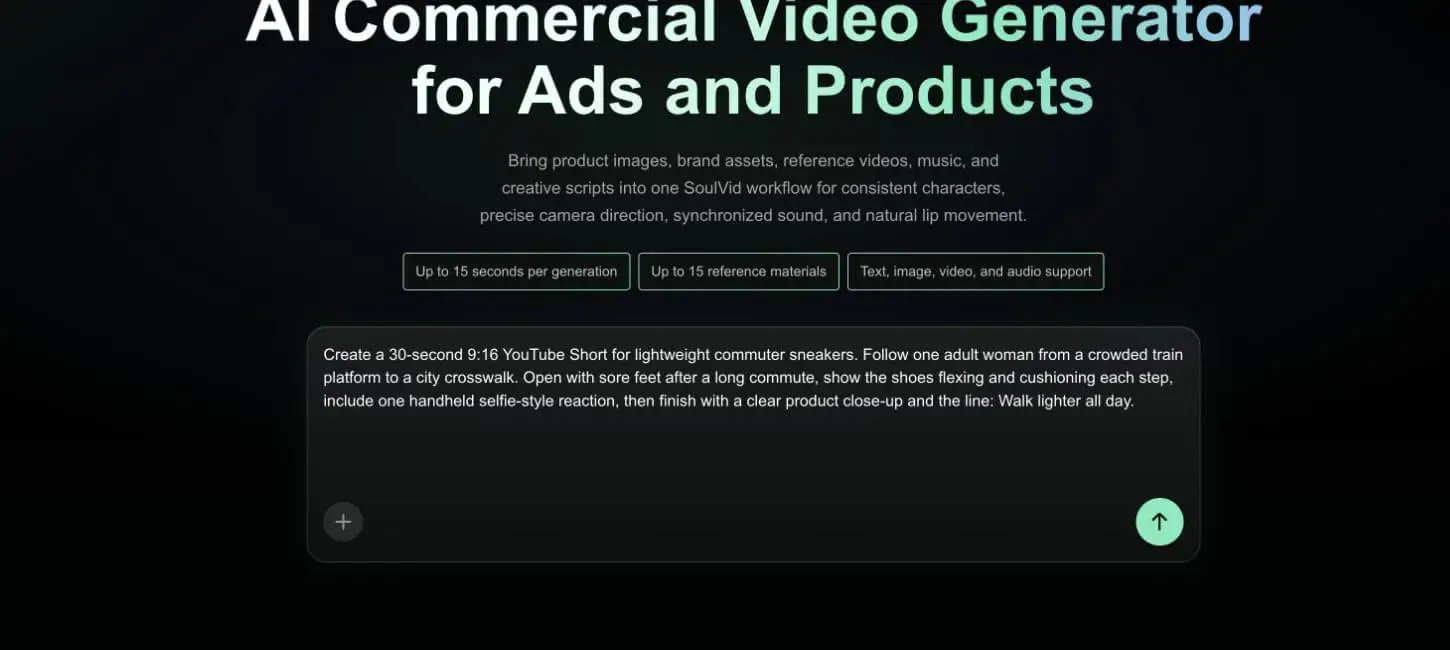
SoulVid is the strongest fit in this group when the concept needs more than one presenter shot. Its commercial video workflow accepts a creative brief plus product images, character references, reference video, music, and other assets. The current page exposes up to 15 reference materials and up to 15 seconds per generation, so a 30-second Short should be planned as several connected clips rather than one long generation.
What we could verify
The live commercial-video entry accepted the complete sneaker brief and exposed the current 15-second generation limit, 15-reference allowance, and text, image, video, and audio inputs. We did not submit the generation or spend account credits, so the screenshot proves the available input workflow rather than a finished SoulVid export.
For this brief, SoulVid should be used to plan a sequence: platform hook, product reveal, walking proof, selfie reaction, cafe close-ups, and final CTA. Product and character references remain part of the same creative context, while weak scenes can be revised separately. This is closer to directing a small campaign than selecting one avatar and pasting a script.
Advantages
- Multi-shot planning: the story can move between locations and camera styles without asking one clip to do everything.
- Reference-driven continuity: product images, character references, motion, sound, and visual style can be described together.
- Local revision: replace a weak walking or product shot while preserving approved parts of the sequence.
- Useful beyond talking heads: suitable for fashion, product demos, narrative ads, and Shorts that mix selfie footage with cinematic details.
Limitations
SoulVid does not provide a marketplace of real creators, and it should not be used to fabricate a customer testimonial. It also does not replace a dedicated social publishing system. A 30-second concept requires multiple generated clips because the current H3 workflow supports up to 15 seconds per generation. Captions and platform-specific packaging may still need a final editing pass.
Best for
Brands and creators who want one consistent person and product across a planned vertical story, especially when a single avatar talking to camera would be visually repetitive.
Direct the Short before generating every clip
Bring the product references, creator direction, hook, proof, and CTA into one editable SoulVid project.
Create a UGC-Style Product VideoArcads: Best for AI Actor Variety and Ad Testing
Arcads presents a large AI actor library and a broad ad-creation suite. Its live public page showed more than 1,000 actors plus tools for talking actors, product showcases, captions, actor replacement, voice changes, translation, and a UGC Studio. It also promotes a canvas workflow for connecting several ad-production tasks.

What we could verify
The public Arcads page visibly placed several vertical AI UGC examples around its creation entry and listed its actor library, UGC Studio, captions, product showcase, actor replacement, translation, and voice tools. We did not log in or export a new Arcads video, so the screenshot represents Arcads' own published examples.
For the sneaker brief, Arcads is most naturally used to test several presenters delivering different hooks. One version could open from the train platform, another could lead with the backup-flats line, and a third could focus on styling. The winning actor and script can then be developed into the final Short.
Advantages
- Actor selection: a large catalog makes it easier to match the audience, age range, setting, and delivery style.
- Creative variation: actor swaps, voice changes, captions, translation, and preset ad formats support rapid testing.
- Product-oriented tools: public options include product showcases and actors holding a product.
Limitations
An AI actor can demonstrate a script but cannot provide a genuine personal review. Large actor libraries also do not automatically produce a natural Short: the hook, pauses, product handling, B-roll, and final edit still need direction. Teams should test the exact product interaction they need, because a convincing talking shot does not prove that complex shoe movement or hand contact will remain accurate.
Best for
Performance marketers and agencies that need many presenter, hook, language, and voice combinations before committing budget to a smaller set of winners.
Creatify: Best for Product-URL Automation and High-Volume Variations
Creatify is built around the ecommerce advertising pipeline. Its live public page described URL-to-video creation, authentic UGC or polished cinematic styles, AI Shorts, batch generation, ad remixing, publishing, and performance analysis. The current toolkit also advertises an Ad Flow editor and a model playground.
What we could verify
Creatify's live homepage contained a carousel of items labeled "AI GENERATED" and publicly described URL-to-video, UGC and cinematic styles, AI Shorts, Ad Flow, and batch generation. We did not enter its logged-in studio or claim an independent Creatify export. The verifiable result is a mature ad-variation workflow and a public sample gallery, not a controlled output from our sneaker prompt.
For the sneaker campaign, the fastest route is to start from the product page, let the platform extract the core product information, and create several vertical ad directions. That makes it useful for testing whether comfort, lightweight construction, office styling, or commute convenience is the stronger angle.
Advantages
- Fast ecommerce setup: a product URL can supply the starting information instead of rebuilding the offer manually.
- Batch production: the public workflow emphasizes multiple variants, hooks, formats, and large creative volume.
- Connected ad workflow: discovery, creation, launch, and performance analysis live inside one advertising-oriented platform.
Limitations
Creatify's public positioning is centered on conversion ads and scale. That is useful for paid campaigns, but an organic YouTube channel may need more deliberate character continuity, storytelling, and creator-specific voice than an automated product-page workflow provides. Review extracted claims carefully and confirm scene-level control before building a complex narrative around one recurring person.
Best for
Ecommerce brands and paid-social teams that already have complete product pages and need a high cadence of testable vertical ads.
MakeUGC: Best for a Direct Script-to-Avatar Workflow
MakeUGC reduces the first workflow to three decisions: write a script, pick an avatar, and generate a video. Its public page also showed more than 1,000 actors, product-in-hand video, motion recreation, custom actors, and an editor for captions, music, B-roll, and trims.

What we could verify
The public MakeUGC page displayed several vertical actor examples below its script-to-avatar entry and described product-in-hand videos, motion recreation, custom actors, captions, music, B-roll, and trimming. We did not log in or generate a paid export, so the image shows MakeUGC's own published examples rather than a result commissioned for this article.
The sneaker brief can become a direct-to-camera recommendation supported by product-in-hand or B-roll inserts. Start with one strong script and actor, then use captions and supporting footage to keep the 30-second edit from feeling static.
Advantages
- Low-friction workflow: the script, actor, and generate sequence is easy to understand.
- Built-in finishing: captions, music, B-roll, and trims reduce the number of tools needed for a basic Short.
- Product presentation options: product-in-hand and motion controls address common UGC ad formats.
Limitations
A simple workflow can encourage simple results. If several brands select similar actors, rooms, gestures, caption styles, and script patterns, the videos can feel interchangeable. Product-in-hand scenes should be reviewed frame by frame for scale, finger contact, labels, and packaging accuracy. A synthetic actor must not be presented as a real customer without disclosure appropriate to the campaign and market.
Best for
Small ecommerce teams and solo marketers who want a recognizable UGC ad format without directing a longer multi-location story.
Billo: Best When the Creator Must Be a Real Person
Billo is fundamentally different from the AI generators above. It connects brands with vetted human creators, then supports briefing, matching, collaboration, delivery, and performance-informed iteration. Its public page listed more than 5,000 creators and highlighted product videos, creator posting, partnership ads, and ad-ready edited delivery.

What we could verify
Billo's public page showed its creator marketing workspace, creative analytics, creator matching, and a network described as more than 5,000 vetted creators. A real Billo result requires opening a campaign, selecting a creator, and usually sending the product, so no campaign footage was commissioned for this comparison.
For the sneaker brief, send the actual shoes and a concise direction to a suitable lifestyle or fashion creator. The final Short can show a real commute, real fit, natural walking, and an honest reaction. The creator should keep their own phrasing while covering the approved hook, proof, and CTA.
Advantages
- Real product use: the creator can wear, flex, walk in, and film the exact physical item.
- Human credibility: expressions, timing, imperfections, and lived context are naturally present.
- Creator distribution: some campaigns can extend into organic creator posts and partnership ads.
Limitations
Real production takes time. The product may need shipping, creators need matching and approval, and reshoots cannot be generated instantly. Cost and turnaround are less predictable than creating another AI variant. Brand teams also need clear usage rights, claim guidance, deadlines, and a practical review process.
Best for
Products that rely on real fit, texture, application, unboxing, taste, or personal trust, and for brands that want footage from identifiable human creators rather than AI presenters.
AI UGC, Real UGC, or a Hybrid Workflow?
| If your main need is... | Start with... | Why |
|---|---|---|
| Ten hooks by tomorrow | Arcads, Creatify, or MakeUGC | AI actors and batch workflows shorten the first testing cycle |
| One coherent multi-shot story | SoulVid | Story planning and references matter more than actor volume |
| A real person using the physical item | Billo | Product handling and experience come from a human creator |
| Visual testing before shipping products | AI first, then Billo | Validate the hook and shot plan before paying for physical production |
| Product accuracy plus cinematic inserts | Billo plus SoulVid | Keep the human testimony and add controlled product or transition shots |
The hybrid route is often the most practical. Use AI to compare hooks, storyboard the edit, and identify missing product shots. Then hire a creator for the testimonial or physical demonstration that needs human trust. If the real footage has weak transitions or lacks a product hero shot, generate supporting visuals without pretending the synthetic material is a customer review.
Copy-Ready 30-Second UGC Shorts Prompt
Lightweight commuter sneaker, one consistent adult creator, six connected vertical shots
Create a 30-second, 9:16 UGC-style YouTube Short for a lightweight commuter sneaker. Build the video from six connected clips. The result should feel like an adult creator sharing a useful discovery during a real city day, not a polished studio spokesperson reading an advertisement.CAMPAIGN GOAL
Show how the sneaker fits a long commute and workday through visible product use: walking, stairs, flexibility, cushioning, styling, and a clear product close-up. The viewer should understand the problem, see the product early, watch it in motion, hear one concise benefit, and finish with a memorable action.
PRODUCT REFERENCE LOCK
Use the uploaded front, side, top, sole, heel, logo, and on-foot images as the source of truth. Preserve the exact silhouette, toe shape, sole thickness, tread pattern, lace count, eyelet position, stitching, material panels, logo placement, and color. Do not add vents, straps, decorative panels, text, or logos. Keep the left and right shoes physically correct. The product must not change size, material, or construction between shots.
CREATOR LOCK
Use the same adult woman in every shot. She is approximately 30 years old with shoulder-length dark brown hair, warm medium skin, and natural daytime makeup. She wears a charcoal trench coat, white cotton T-shirt, straight dark jeans, and the exact reference sneakers. Her performance is relaxed, observant, and lightly amused. Keep her face, body proportions, hair, clothing, and voice consistent. Use natural hands and feet with believable contact, weight, and gait.
VISUAL STYLE
Native phone-shot realism with clean exposure and subtle stabilization. Mix handheld selfie framing with controlled product inserts. Use a cool early-morning train platform, neutral station stairs, a bright city crosswalk, and a small cafe window seat. Keep the colors realistic. Avoid beauty-filter skin, luxury-commercial gloss, aggressive teal-orange grading, perfect studio lighting, dramatic slow motion, or a staged influencer mansion.
SHOT 1 - 0:00 TO 0:04 - THE COMMUTE PROBLEM
Open on a close handheld view of the creator shifting her weight on a crowded train platform. Frame from the knees down for the first second, then tilt quickly but smoothly to her face. She looks into the phone and says: "I stopped carrying backup flats to work." Keep the station recognizable but softly detailed. Show the sneakers clearly before the end of the shot. Add large safe-area captions only if the workflow supports editable text; never generate misspelled text inside the footage.
SHOT 2 - 0:04 TO 0:09 - PRODUCT REVEAL
Cut to a low three-quarter on-foot close-up near a station bench. She lifts one heel, bends the front of the shoe naturally, then sets the foot down. Use one short push-in toward the side profile and sole. Keep the product geometry stable. Voice continues: "These lightweight commuters flex when I move."
SHOT 3 - 0:09 TO 0:15 - MOVEMENT PROOF
Track beside her as she walks up six station steps at a normal pace. Show a full-body angle for two seconds, then cut to a tighter side view of the foot landing and pushing off. The sole compresses only slightly and returns to shape. Her coat and hair move naturally. No running, jumping, floating feet, sliding, or impossible ankle rotation.
SHOT 4 - 0:15 TO 0:21 - SELFIE REACTION
At a bright city crosswalk, she holds the phone at arm's length while waiting for the signal. The sneakers remain visible in a quick downward glance. She says: "They still feel cushioned through the afternoon, and they actually work with my office clothes." Keep the delivery conversational with a small pause after "afternoon." Use believable eye contact and synchronized mouth movement.
SHOT 5 - 0:21 TO 0:27 - PRODUCT DETAILS
At a cafe window seat, show three quick but readable inserts: her crossing one ankle over the other, a close-up of the upper material and stitching, and the sole resting flat on the floor. Use natural window light. Preserve the same color and construction. Do not invent technical diagrams, unsupported material claims, ratings, prices, or customer-review text.
SHOT 6 - 0:27 TO 0:30 - CTA
She exits the cafe, walks two steps along the sidewalk, turns back toward the phone, and says: "Walk lighter all day." Finish on a stable close-up of the shoe landing beside a clean area of pavement with negative space in the upper third for an editable CTA. Hold the final frame for half a second.
EDIT AND SOUND
Use quick straight cuts and one motivated match cut from the station step to the crosswalk step. Keep the pace lively but allow every product detail to read on a phone. Use low-volume city ambience, one train arrival sound, natural footsteps, and subtle upbeat music under the voice. Voice must remain clear and consistent. Keep captions inside YouTube Shorts safe areas and use no more than two short lines at once.
OUTPUT
9:16 vertical, 1080 x 1920, 24 or 30 fps, approximately 30 seconds. Keep the face, product, and optional captions clear on a phone screen. Export a clean master without a platform watermark. Create separate 15-second and 6-second versions only after the 30-second sequence is approved.
NEGATIVE CONSTRAINTS
No changing shoe design, no wrong logo, no extra laces, no warped sole, no left-right mismatch, no melting material, no floating foot, no sliding walk, no extra limbs, no fused fingers, no changing face, no changing outfit, no changing voice, no child or teenage appearance, no crowded foreground blocking the product, no fake review, no unsupported health claim, no invented price, no misspelled text, no giant captions over the shoe, no fast spinning camera, no fisheye distortion, no excessive motion blur, no watermark.
For a deeper product-reference workflow, read How to Make an AI Product Video from Product Images. If the same creator appears in several locations, use the consistency checks in How to Keep Characters Consistent in AI Video.
How to Turn the Prompt Into a Better Short
Approve the risky shots first
Generate or film the product reveal, walking proof, and final product close-up before polishing the selfie dialogue. These shots expose product geometry, footwear movement, and continuity problems early. A convincing face cannot rescue a shoe that changes shape between cuts.
Use shot-level camera prompts to define framing and movement for these difficult scenes before rewriting the complete creative brief.
Keep the script shorter than the visual plan
The prompt is long because it directs production. The spoken script is deliberately short. Viewers need time to see stairs, flex, styling, and close-ups. Filling all 30 seconds with voice makes the Short feel like a compressed sales page.
If you already have a complete draft, use the AI script to video workflow to turn the finished script into editable scenes before generating each clip.
Create three hooks, not three complete videos
Test the backup-flats hook against two alternatives: "My commute is the reason I stopped buying stiff sneakers" and "I wore these from the first train to dinner." Keep the same middle and ending while comparing opening retention. This isolates the variable instead of changing the actor, product, script, and edit at once.
Review on a phone before publishing
Watch once with sound, once muted, and once at normal scrolling distance. Confirm that the product appears in the opening, captions do not collide with interface controls, dialogue remains understandable, and the CTA does not cover the final product frame.
Build the hook, proof, and CTA as one story
Use product and character references to plan a complete vertical campaign, then revise the weak scene without discarding the rest.
Start a Commercial Video ProjectWhich UGC Video Maker Should You Choose?
- Choose SoulVid when the Short needs several locations, product close-ups, a recurring person, and shot-level creative direction.
- Choose Arcads when you need to test many AI actors, voices, languages, and direct-response hooks.
- Choose Creatify when the product page is ready and the priority is turning it into many ecommerce ad variations.
- Choose MakeUGC when you want a simple script-to-avatar path with basic captions, music, B-roll, and trimming in the same workflow.
- Choose Billo when the product must be physically used by a real creator and human trust matters more than instant variation.
Do not choose only from the demo reel. Run the same short brief through your top two options. Compare product accuracy, the first three seconds, natural delivery, revision time, export quality, and the number of clips you can actually publish. The best tool is the one that produces a repeatable workflow for your channel, not the most impressive isolated avatar.
Frequently Asked Questions
What is the best UGC video maker for YouTube Shorts?
SoulVid is a strong choice for a directed multi-shot product story, Arcads for AI actor testing, Creatify for ecommerce automation, MakeUGC for a simple avatar workflow, and Billo for real human creators. The best option depends on whether you need speed, product accuracy, narrative control, or genuine human use.
Can AI UGC videos be used on YouTube Shorts?
Yes, provided the video follows YouTube's current rules, uses assets and voices you have permission to use, and does not mislead viewers. Export in 9:16, keep important elements inside safe areas, review captions and claims, and apply any disclosure required for synthetic or altered content.
Should a YouTube Short be 15 or 30 seconds?
Use the shortest length that delivers the hook, proof, and payoff. A simple talking-head recommendation may work in 15 seconds. A product story with several demonstrations often needs 25 to 35 seconds. Retention and clarity matter more than filling a fixed duration.
Is AI UGC the same as real customer UGC?
No. AI UGC recreates the visual language of creator content using synthetic actors, generated scenes, or AI-assisted editing. Real UGC comes from an actual person filming or discussing a product. Do not present an AI actor as a real customer or invent personal experience.
Can I make one video and post it to Shorts, Reels, and TikTok?
You can reuse the creative concept, but review each platform version separately. Caption positions, music rights, CTA wording, duration, and interface safe areas differ. Export clean masters and create platform-specific versions instead of downloading a watermarked post from one network and uploading it to another.